Stripe vs. PayPal: Best for Freelancers?
Stripe vs. PayPal: Best for Freelancers?
For freelancers, choosing between Stripe and PayPal depends on your priorities: simplicity or advanced features. PayPal is user-friendly, globally recognized, and ideal for quick setups. Stripe, on the other hand, offers more control, lower fees for high-value or international payments, and tools for customization.
Key Takeaways:
- PayPal: Best for freelancers who want easy setup, client familiarity, and basic invoicing and payment reminders. Fees for international payments and disputes are higher, and fund holds can occur.
- Stripe: Ideal for tech-savvy freelancers or those handling international clients. Offers lower fees for ACH transfers and currency conversion, but setup may require technical skills.
Quick Comparison:
| Feature | Stripe | PayPal |
|---|---|---|
| Ease of Use | Requires setup; coding for advanced features | Instant setup; no coding needed |
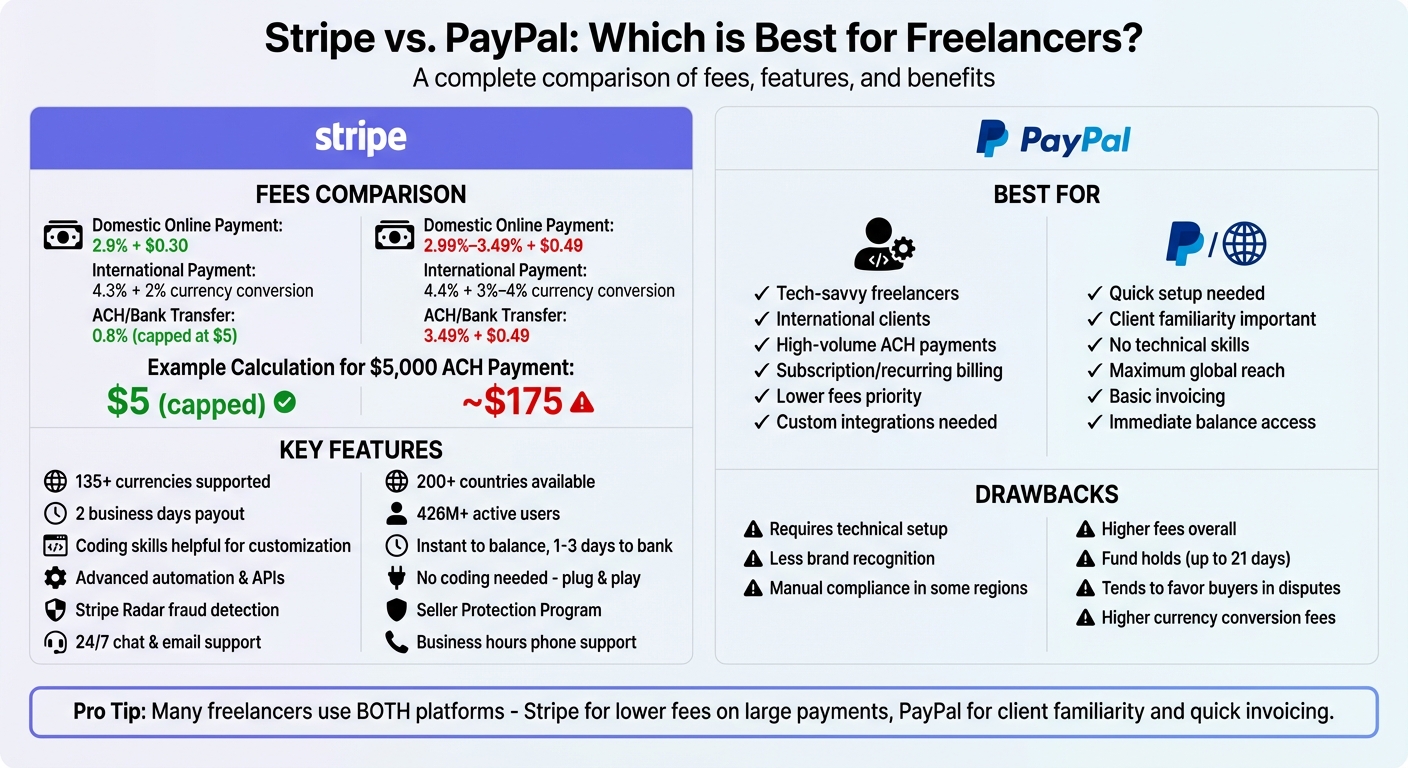
| Fees (Domestic) | 2.9% + $0.30 | 2.99%–3.49% + $0.49 |
| Fees (International) | 4.3% + 2% currency conversion | 4.4% + 3%–4% currency conversion |
| ACH Transfers | 0.8% (capped at $5) | 3.49% + $0.49 |
| Invoicing | $0.4%–0.7% per invoice | $0 (basic) or $14.99/month (advanced) |
| Payout Speed | 2 business days (standard) | Instant to balance; 1–3 days to bank |
| Security | Stripe Radar (fraud detection) | Seller Protection for disputes |
Stripe is better for freelancers needing lower fees and flexibility, while PayPal suits those prioritizing simplicity and client trust. Some freelancers use both to balance convenience and cost.
Stripe vs PayPal for Freelancers: Complete Fee and Feature Comparison
Stripe vs PayPal Comparison: Which is Better for YOU?
sbb-itb-66f4c95
Stripe for Freelancers
Stripe is a payment platform designed with developers in mind, offering customization options and a global reach. While it does cater to those with technical skills, it also provides tools that freelancers can use to manage payments effectively - especially for those working internationally or handling complex billing needs.
One of Stripe's standout features is its ability to process payments in over 135 currencies, making it easier to bill clients in their local currency and avoid unnecessary complications. In addition to standard credit and debit cards, Stripe supports ACH transfers, Apple Pay, Google Pay, and various regional payment methods. For freelancers who aren't tech-savvy, features like Payment Links and Invoicing allow for quick payment acceptance and the ability to send branded invoices with ease.
For those with technical expertise, Stripe's APIs offer the ability to create custom checkout solutions. The platform also supports recurring billing for retainers, sends automated reminders for payments, and integrates seamlessly with tools like QuickBooks to help during tax season. These features are particularly useful for managing international payments and recurring income. Stripe also offers a competitive currency conversion markup of 2%, which is notably lower than the 3–4% charged by many competitors.
Features and Benefits
Stripe stands out for freelancers in several key areas:
- Invoicing and Payment Reminders: Stripe automates payment reminders, reducing the hassle of chasing down late payments. It supports various billing models, including one-time payments, subscriptions, and milestone-based billing.
- Detailed Reporting and Tax Support: For freelancers juggling multiple projects, Stripe simplifies bookkeeping with detailed financial reports and automated tax calculations.
- Customizable Checkout: The Stripe Checkout feature provides a prebuilt payment page that balances simplicity with branding options, so freelancers don't need to build a payment system from scratch.
- Cost-Effective ACH Transfers: For large payments, ACH transfers are a budget-friendly option with fees capped at just $5 per transaction, regardless of the amount.
Drawbacks
While Stripe offers flexibility and advanced features, using it to its fullest potential often requires technical skills. Freelancers without development experience may need to hire a developer to unlock certain capabilities. This can make the platform less appealing for those who want a quick and simple setup.
Another limitation is Stripe's lack of brand familiarity compared to PayPal. Clients, especially casual users, might hesitate when encountering a Stripe checkout page because they are less familiar with the platform. Additionally, in regions like India, Stripe may require manual compliance steps, which competitors often handle automatically.
Stripe Features Summary
| Feature | Details |
|---|---|
| Accepted Payment Methods | Credit/Debit cards, ACH, Apple Pay, Google Pay, local payment methods |
| Supported Currencies | 135+ currencies |
| Invoicing | Branded invoices, automated reminders, recurring billing, milestone payments |
| Developer Tools | APIs, customizable Checkout, webhooks for advanced integrations |
| International Fee | 4.3% for international cards + 2% currency conversion |
| Security | PCI compliance, encryption, fraud detection (Radar) |
PayPal for Freelancers
PayPal is all about simplicity and trust. While platforms like Stripe cater to users who need advanced customization and technical features, PayPal focuses on making payment acceptance quick and straightforward. With a massive user base of over 426 million active accounts worldwide and operations in more than 200 countries, it’s a platform many freelancers and clients already know and rely on. Plus, it offers a no-code, plug-and-play solution, allowing even guest checkouts for clients.
Its user-friendly and familiar interface helps reduce any hesitation clients may feel when making payments.
Features and Benefits
PayPal is designed with ease of use in mind, making it a great fit for freelancers who want to get started quickly without technical setup. Its invoicing tools allow you to create polished, professional invoices that include your branding and logo. These invoices can be sent directly through the platform, with automated reminders to nudge clients for payment. Payments are just a click away for clients, simplifying the process.
For even faster transactions, PayPal.Me gives you a personalized payment link you can share via text, email, or messaging apps. This feature allows clients to send payments instantly without needing your bank details.
The mobile app, available for both iOS and Android, ensures you can manage transactions from anywhere. If you handle in-person payments, PayPal offers QR code payments at a rate of 2.29% + $0.09 per transaction. International freelancers also benefit from features like automated compliance handling, including support for the Foreign Inward Remittance Advice (FIRA) process for users in India.
Another key perk is PayPal's Seller Protection, which helps shield eligible transactions from certain types of fraud. This can be especially reassuring when working with international clients. The platform also supports payments in multiple currencies, automatically converting them. However, this convenience comes with a currency conversion markup of 3% to 4% over base exchange rates. Standard payouts typically take 1–3 business days, but instant transfers are available for an additional fee of 1.5%.
Drawbacks
While PayPal is easy to use, it does come with some challenges, particularly for freelancers who depend on consistent cash flow. One major issue is its approach to disputes. As the SoloFinanceHub Team points out, “PayPal: Notorious for siding with buyers. If a client disputes a payment, PayPal tends to favor the client”. During these disputes, PayPal freezes the associated funds, and investigations can take weeks to resolve.
Even outside of disputes, fund holds can be a headache. New accounts or accounts flagged for "unusual activity" may face holds of up to 21 days without warning. This unpredictability can be risky, especially if you rely on PayPal for immediate expenses like rent or bills.
Fees are another area where PayPal can take a bite out of your earnings. Domestic transactions cost 2.99% + $0.49, while international payments jump to 4.4% plus a fixed fee based on the currency. Currency conversion fees are also higher than some competitors, ranging from 3% to 4% compared to Stripe's 2%. Chargebacks can cost you $15 to $20 each, and PayPal no longer refunds the original transaction fee when you issue a refund.
PayPal Features Summary
| Feature | Details |
|---|---|
| Global Availability | 200+ countries and markets |
| Accepted Payment Methods | Credit/Debit cards, PayPal balance, Venmo (US), Guest checkout |
| User-Friendliness | High; beginner-friendly plug-and-play interface |
| Key Freelancer Tools | Professional Invoicing, PayPal.Me, Business Mobile App, QR codes |
| Protection | Seller Protection for eligible transactions |
| Payout Speed | 1–3 business days (Standard); Instant available for 1.5% fee |
| Domestic Fee | 2.99% + $0.49 per transaction |
| International Fee | 4.4% + fixed fee (varies by currency) |
| Currency Conversion | 3% to 4% markup |
Fees and Pricing
Fee Details
Stripe charges a standard rate of 2.9% + $0.30 for domestic online payments, while PayPal's fees range between 2.99% and 3.49% + $0.49, depending on whether you use standard processing or PayPal Checkout. While a difference of $0.19 per transaction might seem minor, it can add up quickly for businesses handling frequent payments.
The disparity becomes even more pronounced with high-value invoices paid via ACH (bank transfer). Stripe charges 0.8%, capped at $5 per transaction. For example, on a $5,000 invoice, you’d pay just $5 with Stripe. On the other hand, PayPal’s fee is significantly higher at 3.49% + $0.49, which translates to approximately $175 for the same $5,000 payment.
When it comes to international payments, Stripe also has a cost advantage. Stripe charges 4.3% for international card transactions, along with a 2% currency conversion fee. PayPal, however, imposes a fee of 4.4% plus a fixed fee (which varies by currency) and a 3% to 4% currency conversion markup. For freelancers or businesses working with international clients, that extra 1% to 2% in currency conversion fees can add up to hundreds of dollars annually.
Both platforms charge fees for chargebacks. Stripe has a flat chargeback fee of $15, whereas PayPal's fee ranges between $15 and $20. If you need instant access to your funds, both Stripe and PayPal impose a 1.5% fee for instant payouts to your bank account.
For invoicing, Stripe uses a usage-based model, charging 0.4% to 0.7% per paid invoice. In contrast, PayPal offers free standard invoicing but charges $14.99 per month for access to advanced invoicing features.
"Stripe is cheaper at virtually every volume level due to lower per-transaction fees." – RunSmartGuide
Fee Comparison Table
| Fee Type | Stripe | PayPal |
|---|---|---|
| Domestic Online Payment | 2.9% + $0.30 | 2.99% – 3.49% + $0.49 |
| International Payment | 4.3% | 4.4% + fixed fee |
| ACH / Bank Transfer | 0.8% (capped at $5) | 3.49% + $0.49 |
| Currency Conversion | 2% markup | 3% – 4% markup |
| Chargeback Fee | $15 | $15 – $20 |
| Invoicing | 0.4% – 0.7% per invoice | $0 (Standard) or $14.99/month (Advanced) |
| Instant Payout | 1.5% fee | 1.5% fee |
Setup and Integrations
User Experience Comparison
PayPal offers a straightforward, plug-and-play dashboard designed for quick invoicing and transfers. This simplicity makes it ideal for freelancers who want to avoid technical challenges. You can create an account and start accepting payments in just a few minutes.
Stripe, on the other hand, requires a bit more effort to set up. While features like Payment Links allow non-technical users to get started, unlocking Stripe's full range of capabilities often involves API integration or developer assistance. Its dashboard provides real-time analytics and advanced reporting tools, which can be a bit overwhelming if your needs are as simple as sending an invoice.
The checkout process also shows a clear difference. PayPal typically redirects customers to its branded page to complete payments, leveraging its widespread recognition to build trust. Stripe, however, allows customers to enter their card details directly on your website, creating a smoother experience but requiring more technical setup.
"If you don't want to deal with technical integrations, PayPal gets you up and running quickly." – MassInvoices
Beyond the initial user experience, the platforms differ in their integration capabilities.
Third-Party Integrations
While ease of use is a key factor, the ability to integrate with other tools can significantly impact workflow efficiency. Both PayPal and Stripe support popular freelance tools like QuickBooks, Shopify, and WooCommerce. However, Stripe takes the lead with its robust API and detailed documentation, offering compatibility with CRMs such as Salesforce and HubSpot. This makes it a strong choice for freelancers who need to automate complex workflows or build custom solutions.
PayPal’s integrations are more focused on e-commerce platforms and basic invoicing tools. Both platforms can connect to thousands of apps using automation tools like Zapier, helping streamline tasks and sync payments. Below is a quick comparison of their usability and integration features:
Usability Comparison Table
| Feature | Stripe | PayPal |
|---|---|---|
| Setup Time | Quick for basics; longer for custom setups | Instant / Near-instant |
| Technical Skills Required | Coding/API knowledge for customization | Minimal to none |
| Checkout Experience | On-site, seamless, customizable | Redirects to PayPal site |
| Dashboard Complexity | Advanced with detailed analytics | Simple and intuitive |
| Third-Party Integrations | CRM, Accounting, E-commerce, SaaS | E-commerce, Invoicing |
| Best For | Scaling, automation, tech-savvy users | Quick setup, one-time invoices |
Payouts, Security, and Support
Let’s dive into how Stripe and PayPal handle payouts, security, and customer support - three critical factors for freelancers and businesses managing payments.
Payout Timing
Stripe processes bank transfers within 2 business days, offering a predictable schedule for cash flow. If you’re in a rush, Stripe provides instant payouts to a debit card for 1.5% of the amount (with a $0.50 minimum fee).
PayPal, on the other hand, deposits funds into your PayPal balance almost immediately after a payment is made. However, moving that money to your bank account takes 1–3 days. Like Stripe, PayPal also allows instant transfers to a debit card or bank account for 1.5% of the transfer amount.
The main difference? PayPal gives you immediate access to funds in your digital balance, while Stripe prioritizes predictable bank deposits. Both platforms require users to stay vigilant about account holds to avoid interruptions.
Security Measures
Both Stripe and PayPal meet PCI DSS compliance standards and use encryption to safeguard transactions. However, their fraud prevention strategies differ:
- Stripe Radar: This AI-driven system analyzes data in real time to detect and block fraudulent activity before it escalates. By proactively preventing fraud, Stripe helps reduce chargebacks.
- PayPal Seller Protection: This program is designed to cover eligible disputes, such as unauthorized payments or items-not-received claims. PayPal also employs SSL/TLS encryption and biometric verification (like fingerprint or facial recognition) on its mobile app, which enhances security for sellers and buyers.
When it comes to chargebacks, Stripe charges a flat $15 fee, while PayPal charges $15–$20, depending on the case. These fees apply regardless of the dispute outcome. For businesses handling occasional disputes, Stripe’s consistent fee structure may save money over time.
Customer Support
Stripe provides 24/7 chat and email support, along with extensive documentation and a developer-friendly Discord community. This makes it easier to resolve technical issues or clarify payment questions quickly.
PayPal offers phone and message support, but only during business hours. Many users report frustration with PayPal’s Resolution Center, citing delays in getting human assistance and challenges with account holds or freezes.
"Stripe has more reliable support, PayPal has stronger buyer protection." – MassInvoices
For freelancers and small businesses, having reliable payouts and strong security measures is essential to maintaining financial stability and client trust.
Payout and Security Comparison Table
| Feature | Stripe | PayPal |
|---|---|---|
| Standard Payout Speed | 2 business days | 1–3 days to bank (Instant to balance) |
| Instant Payout Fee | 1.5% (min. $0.50) | 1.5% |
| Fraud Protection | Stripe Radar (Machine Learning) | Seller Protection Program |
| Chargeback Fee | $15 | $15–$20 |
| Security Standards | PCI DSS, 2FA, AES-256 Encryption | PCI DSS, 2FA, Biometric, SSL/TLS |
| Customer Support | 24/7 Chat & Email | Business Hours: Phone & Message |
Which Platform Is Best for Freelancers?
The best payment platform for freelancers depends on your technical skills, client preferences, and how you prioritize fees and features. PayPal is a go-to option for freelancers who want a simple, quick setup. Known for its global recognition and ease of use, it’s perfect for those just starting out or lacking technical know-how. On the other hand, Stripe is tailored for freelancers with coding skills who want customizable checkout options and more affordable international transaction fees.
"Stripe is the choice for freelancers who want more control, customization and global transaction capabilities. It's developer-friendly and built for those who want to automate or scale their freelance business." – Riten Debnath, Founder, Fueler
For freelancers working internationally, Stripe stands out with its lower currency conversion fees. Meanwhile, PayPal’s widespread availability makes it a reliable option in regions where Stripe isn’t supported. Many freelancers find value in using both platforms - Stripe for its lower fees on credit card and ACH payments, and PayPal for its familiarity and ease of use in client transactions.
Here’s a quick guide to help you decide which platform fits your needs:
Platform Selection Guide
| Freelancer Situation | Recommended Platform |
|---|---|
| Prioritizing Simplicity | PayPal |
| Technical Users (Coding Skills) | Stripe |
| International (Multi-currency) | Stripe (Lower conversion fees) |
| High-Volume ACH Payments | Stripe (0.8%, capped at $5) |
| Subscription/Recurring Billing | Stripe (Advanced automation) |
| Maximum Global Client Reach | PayPal |
| Invoicing Only | PayPal or Stripe Payment Links |
Beyond choosing a payment gateway, managing timely payments is equally important.
Paid on Time: A Payment Management Tool for Freelancers
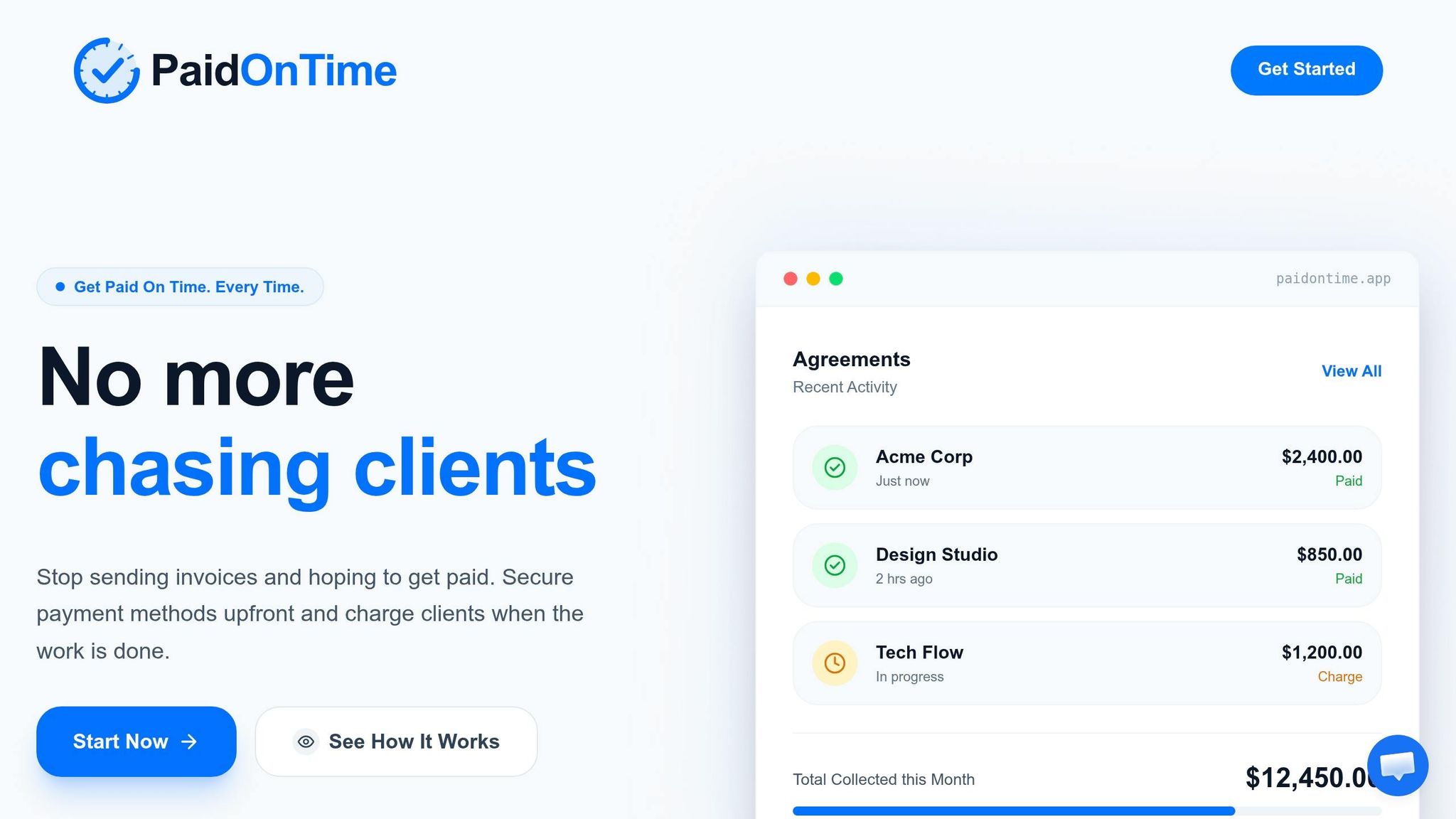
While Stripe and PayPal handle the payment process, Paid on Time (https://paidontime.app) addresses the common issue of delayed payments. With 80% of freelancers reporting late payments, this tool ensures you get paid on time by creating legally binding agreements and securing client payment details upfront. Once your work is done, you can charge the client with a single click, cutting out the hassle of back-and-forth invoicing and reducing disputes.
Paid on Time charges a 5% transaction fee with no monthly subscriptions. It integrates seamlessly with Stripe or PayPal, offering steady cash flow and clear payment records without replacing your existing payment system. For freelancers dealing with late payments, it’s a practical solution to safeguard your income and ensure your efforts are rewarded promptly.
FAQs
Which is cheaper for $5,000+ invoices?
When dealing with invoices over $5,000, Stripe often proves to be the more affordable option, especially if you're using bank transfers (ACH). Here's how the fees break down:
- For ACH payments, Stripe charges approximately $5 on a $5,000 invoice, which is significantly lower than PayPal's fee of $150.09.
- When it comes to credit or debit card payments, Stripe's fee comes in at around $145.30, slightly under PayPal's $150.09.
In short, Stripe stands out as the more cost-effective choice for processing large invoices, particularly when ACH payments are involved.
Will clients trust Stripe checkout?
Clients tend to trust Stripe Checkout because of its solid reputation for security and professionalism. Its sleek and customizable design can boost customer confidence, especially when it’s part of a freelancer’s branded website. While PayPal is well-known due to its long history, Stripe’s smooth, white-label checkout creates a polished experience that meets high expectations and builds trust when used thoughtfully.
How can I avoid PayPal payment holds?
If you want to avoid PayPal payment holds, it's important to keep your account in line with their policies and promptly provide any information they request. Payment holds often happen because of things like unusual account activity, buyer disputes, or selling items that are considered higher risk.
To get your funds released, here are a few steps you can take:
- Add tracking information: If you’re shipping physical items, provide accurate tracking details so PayPal can verify delivery.
- Mark services or digital goods as 'Completed': For non-physical items, update the transaction status to let PayPal know the service or delivery is finished.
- Use PayPal shipping labels: This can help streamline the process and show proof of shipment.
Keeping your account in good standing is key. Avoid any behavior that might seem suspicious, and try to resolve disputes quickly to minimize the chances of future holds.