Best Payment Tools for Independent Contractors
Best Payment Tools for Independent Contractors
Independent contractors often face delayed payments, cash flow issues, and high transaction fees. This article reviews four payment tools - Paid on Time, PayPal, Stripe, and QuickBooks - to help you choose the right one for faster payments, lower fees, and better financial management.
Key Takeaways:
- Paid on Time: Charges a flat 5% per transaction and ensures upfront payments through legally binding agreements.
- PayPal: Offers instant payments but has higher fees for international transactions (up to 4.4% + fixed fees).
- Stripe: Ideal for tech-savvy users with low international fees (4.3%) and advanced automation tools.
- QuickBooks: Simplifies tax reporting with automated 1099 filings and integrates with its accounting software.
Quick Comparison
| Tool | Transaction Fees | Payout Speed | Security Features | US Tax Compliance |
|---|---|---|---|---|
| Paid on Time | Flat 5% | Instant after project | Legally binding agreements | Supports 1099-NEC filings |
| PayPal | 3.49% + $0.49 (domestic) | Instant or 1-2 days | End-to-end encryption, fraud tools | Tax Center with 1099-K access |
| Stripe | 2.9% + $0.30 (domestic) | 2 days (standard) | Advanced fraud detection (Radar) | Automated 1099 generation |
| QuickBooks | 2.99% (invoiced cards) | Next day (standard) | PCI-compliant, dispute protection | Automated 1099-NEC filing |
Each tool serves different needs. If you want upfront payments, go with Paid on Time. For international work, Stripe is a strong option. PayPal is great for ease of use, while QuickBooks simplifies taxes and accounting.
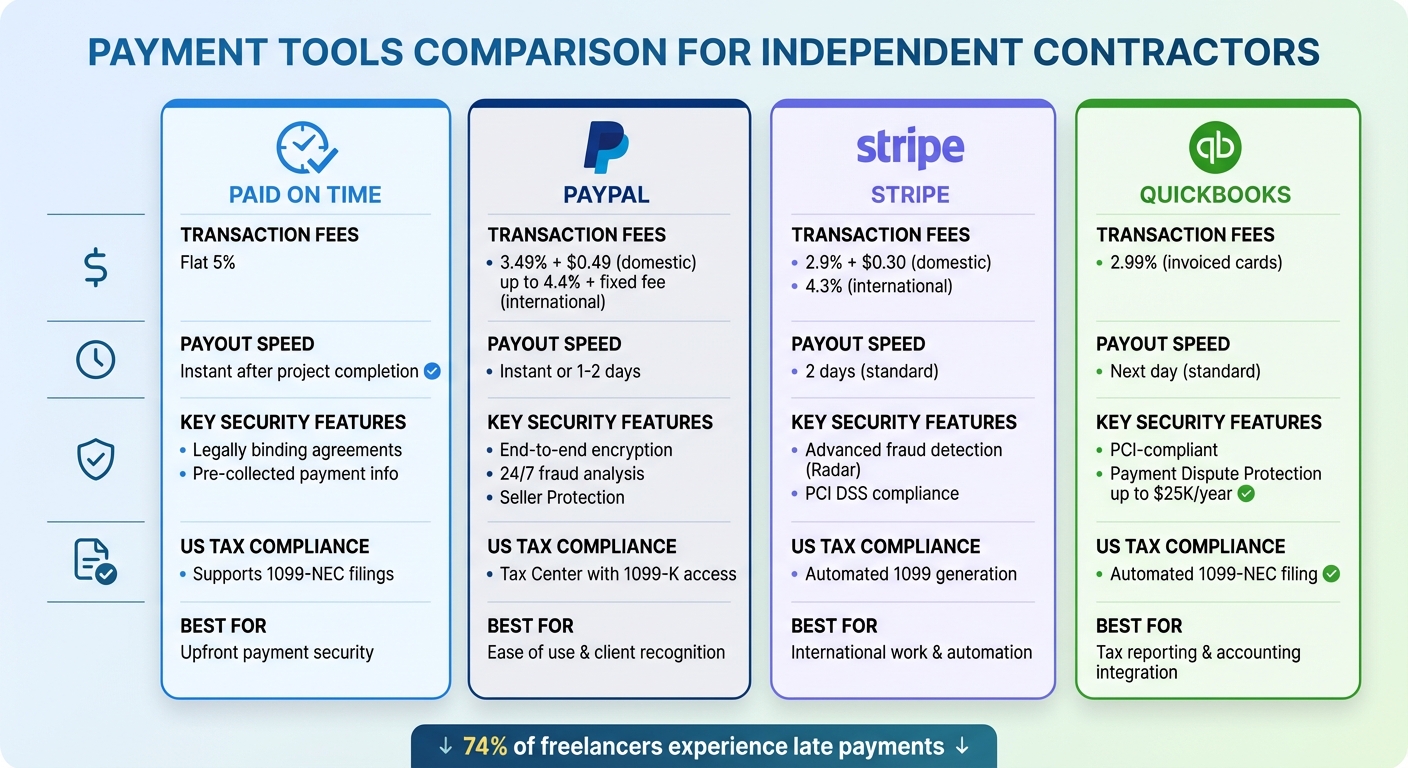
Payment Tools Comparison for Independent Contractors: Fees, Speed & Features
how to get paid as a freelancer online + my fave tools after 5 years of working as a freelancer
1. Paid on Time
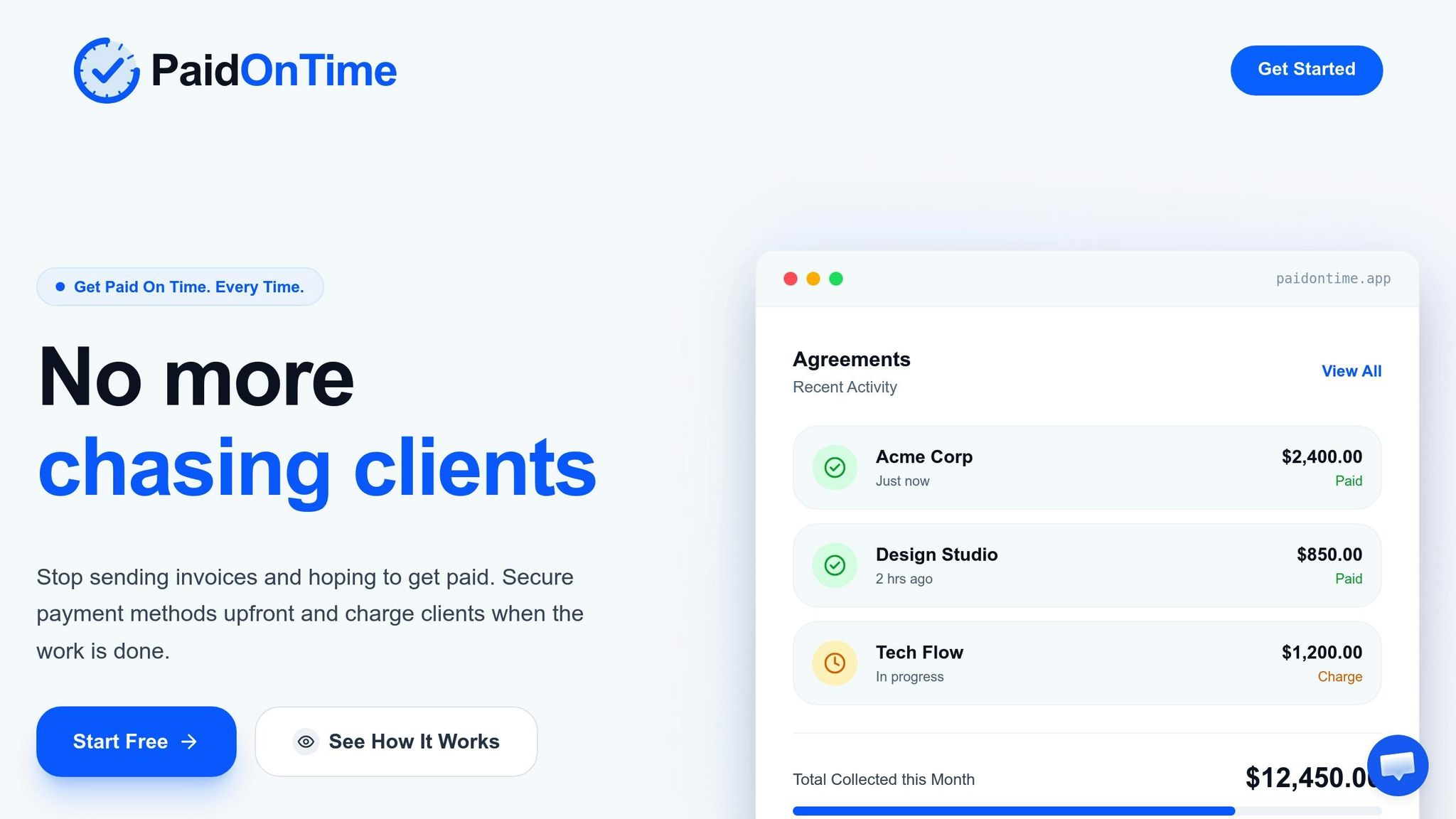
Paid on Time ensures you get paid upfront, removing the hassle of chasing payments. Before you start a project, you'll set up a legally binding agreement with your client. They provide their payment method right away, and once your work is done, you can charge them instantly with just one click. Here’s a closer look at how Paid on Time stands out in terms of fees, speed, security, and tax compliance in the US.
Transaction Fees
There’s a flat 5% fee per transaction - no hidden monthly charges or upfront costs. This setup works particularly well for larger projects, where the guarantee of quick payment outweighs the transaction fee.
Payout Speed
Since payment details are collected at the start, Paid on Time makes getting paid effortless. Once the project is complete, you charge the client instantly and receive the funds without delay.
Security Features
Paid on Time prioritizes security by establishing legally binding agreements before any work begins. Payment information is pre-collected, keeping your personal bank details private. Plus, every transaction generates clear records and receipts, reducing the chances of disputes.
US-Specific Compliance
Each transaction comes with official records that meet US tax requirements. Payments over $600 annually are documented to support Form 1099-NEC filings. These detailed records help independent contractors stay organized for tax filing and business accounting purposes.
2. PayPal
With 430 million active accounts and support for more than 130 currencies, PayPal is a go-to payment platform for independent contractors in the US. Its instant setup and high client recognition are key advantages - 77% of PayPal invoices are paid within one day of being sent. Thanks to its widespread use, most clients are already familiar with PayPal, which helps ensure faster payments. This popularity also brings the benefit of transparent pricing and reliable payout speeds.
Transaction Fees
PayPal's fee structure depends on the type of transaction:
- 3.49% + $0.49 per transaction for invoices sent through PayPal or Venmo.
- 2.99% + $0.49 for card payments.
- For international transactions, the rate increases to 4.4% plus a fixed fee based on the currency.
- Currency conversion comes with an additional 3% to 4% markup over the base exchange rate.
- Instant transfers from your PayPal balance to a bank account incur a 1.5% fee.
- Chargebacks cost between $15 and $20 per instance.
These fees can add up, especially for international or high-volume transactions, so it's worth factoring them into your pricing.
Payout Speed
One of PayPal's standout features is its speed. Payments between PayPal accounts are nearly instant, with funds appearing in your account within minutes. Standard bank transfers take about two business days, but if you need immediate access, the Instant Transfer option moves money to your bank account or debit card right away for a 1.5% fee. These quick payout options are particularly useful for freelancers who need steady cash flow.
Security Features
PayPal prioritizes security with features like 24/7 transaction fraud analysis and end-to-end encryption. For eligible transactions, the platform offers Seller Protection, which safeguards against losses from chargebacks or payment reversals. If issues arise, you have a 180-day window to file disputes. Additionally, PayPal handles PCI DSS compliance on your behalf, so you don’t have to manage complex security requirements yourself.
US-Specific Compliance
PayPal simplifies tax reporting with its dedicated Tax Center, where you can access 1099-K forms and other necessary tax documents. Setting up a business account requires your Social Security Number (SSN) or Employer Identification Number (EIN), along with bank account details. For easier financial management, PayPal integrates seamlessly with accounting tools like QuickBooks, making it simpler to track earnings and prepare for tax season.
3. Stripe
Stripe operates on a pay-as-you-go model with no setup or monthly fees, making it an accessible option for contractor payments. With support for over 135 currencies and more than 100 payment methods, it’s especially useful for those working with international clients.
Transaction Fees
Stripe’s pricing is straightforward:
- Domestic credit and debit card transactions: 2.9% + $0.30 per successful transaction.
- International cards: An additional 1.5% fee plus a 1% currency conversion markup.
- ACH Direct Debit: 0.8% per transaction, capped at $5 for invoices over $625.
- Invoicing: 0.4% per paid invoice.
- Chargebacks: A $15 fee, refunded if the dispute is resolved in your favor.
Payout Speed
For US bank accounts, standard payouts typically take two business days. However, new accounts might face a delay of 7 to 14 days after the first payment. Need faster access? Instant Payouts are available 24/7, delivering funds within 30 minutes for a 1.5% fee (minimum $0.50). Additionally, US-based contractors can opt for a 2-day ACH settlement to bypass the usual 4-day wait time for ACH transfers.
Security Features
Stripe prioritizes transaction security with advanced tools:
- Radar: A machine learning system designed to detect and block fraudulent activities.
- PCI DSS Compliance: Transactions are encrypted to ensure sensitive card data never touches your servers.
- Dynamic 3D Secure: Adds an extra authentication step for high-risk payments, reducing fraud liability.
- Multifactor Authentication: Protects the Stripe Dashboard with options like SMS, Google Authenticator, or U2F hardware keys.
- Dispute Management: Automates chargeback processes and assists in submitting evidence for disputes.
US-Specific Compliance
Stripe simplifies tax and regulatory compliance for US-based contractors:
- 1099 Support: Automatically handles contractor tax forms.
- Stripe Tax: Calculates taxes automatically for transactions.
- KYC and AML Checks: Verifies client identities to meet federal standards.
- Regulatory Oversight: Stripe is monitored by the Treasury Department, Federal Reserve, and Consumer Financial Protection Bureau (CFPB).
For contractors without a website, Stripe offers Payment Links. These secure links can be created directly in the Stripe Dashboard, allowing payment requests to be sent via email or text without needing to manually process card details.
Next, we’ll take a closer look at QuickBooks, a tool designed to simplify financial management for independent contractors.
sbb-itb-66f4c95
4. QuickBooks
QuickBooks takes a different approach to transaction fees, avoiding the typical flat per-transaction charge. Instead of adding a $0.30 fee to a percentage, QuickBooks charges 2.99% for invoiced card payments with no extra costs. This setup works well for contractors handling smaller invoices. Beyond payment processing, it offers tools to streamline cash flow management and reduce administrative tasks.
Transaction Fees
QuickBooks provides competitive rates for various payment methods:
- ACH bank transfers: 1%
- In-person card reader payments: 2.5%
- Keyed-in card payments: 3.5%
For international transactions, an additional 1% applies. Contractors processing more than $2,500 monthly may qualify for discounts of up to 25% on transaction fees. Additionally, QuickBooks integrates digital wallet options like Apple Pay, PayPal, and Venmo directly into its invoicing system.
Payout Speed
Standard deposits usually arrive the next business day. For those who need quicker access, Instant Deposits are available around the clock - even on weekends - for a 1.75% fee. Zach Gunderson, Co-Founder of Clear Start Digital, highlights the convenience of recurring payments:
Recurring payments is a game-changer. Clients get charged automatically each month and receive a receipt. So I can focus on growing my business rather than dealing with billing headaches.
Security Features
QuickBooks prioritizes security with its Payment Dispute Protection, which covers up to $25,000 annually (capped at $10,000 per dispute) for enrolled users. Payment services are managed by Intuit Payments Inc., licensed by the New York State Department of Financial Services. The platform also uses PCI-compliant processing and requires a PIN for direct deposit setup. Automated reconciliation reduces manual effort, matching payments to bank transactions and cutting down manual payment matching by 60%.
US-Specific Compliance
QuickBooks simplifies compliance and accounting for independent contractors. Its Contractor Payments plan ($15/month for up to 20 contractors) automates W-9 collection and handles unlimited 1099-NEC and 1099-MISC e-filing. Contractors can securely input their bank and tax details through a self-setup portal, reducing the need for sensitive data handling. Throughout the year, QuickBooks automatically assigns payments to the correct tax categories and maps expense accounts to 1099 vendors. This ensures compliance with IRS requirements to issue Form 1099-NEC for payments of $600 or more annually.
Advantages and Disadvantages
Here’s a quick rundown of the key strengths and weaknesses of each tool, summarizing their performance based on transaction fees, payout speed, security, and compliance.
| Tool | Advantages | Disadvantages |
|---|---|---|
| Paid on Time | • Flat 5% fee with legally binding agreements ensures predictable payments • One-click charging simplifies invoicing • Provides consistent cash flow through upfront payment collection |
• Best for contractors who can secure payment commitments in advance • Newer platform with limited brand awareness |
| PayPal | • Accepted in over 200 countries • Instant access to funds • Highly trusted and widely recognized • Easy setup with no technical skills required |
• Higher fees for international transactions (4.4% plus a fixed fee) • Currency conversion includes a 3–4% markup • Chargeback fees can be costly • Risk of account freezes |
| Stripe | • Lower international card fees (4.3%) • Supports multiple currencies • Strong automation for recurring payments • ACH transfers capped at $5 • Integrates well with various business tools |
• Requires technical setup and coding knowledge • Not ideal for contractors without a website • Steeper learning curve for non-technical users |
| QuickBooks | • Automated 1099 filing simplifies tax reporting • Next-day deposits speed up payouts • Integrates seamlessly with its accounting features |
• Limited compatibility with non–QuickBooks software • Less flexible for users of other accounting platforms • Requires a monthly subscription for full functionality |
Each tool caters to different needs. If global recognition and quick fund access are priorities, PayPal is a solid choice, despite its higher fees. For tech-savvy users who value automation and lower international costs, Stripe is a great fit. QuickBooks appeals to those focused on tax compliance and integrated accounting. Finally, Paid on Time is perfect for contractors who want to avoid payment delays by securing upfront commitments.
Pick the option that matches your cash flow needs and technical expertise.
Conclusion
In today’s world, where steady cash flow is essential, Paid on Time provides a solution designed specifically for independent contractors. If chasing overdue payments has become a frustrating norm, this platform changes the game by securing funds upfront through legally binding agreements. With a flat, predictable 5% fee, there’s no room for surprise charges or payment uncertainty.
Security is a key focus of the platform. By setting up legally binding agreements before any work begins, Paid on Time ensures your personal bank details stay private while creating detailed transaction records. These records help minimize disputes and keep everything transparent. Plus, payment details are collected upfront, so you can charge clients instantly upon project completion and receive your funds without delay.
Here’s the reality: 74% of freelancers report experiencing late payments. This makes having a reliable payment process vital for maintaining healthy cash flow. Paid on Time steps in to tackle this issue head-on, securing payment commitments before work starts and eliminating the hassle of chasing overdue invoices.
The platform also streamlines the invoicing process with its one-click charging feature, ensuring consistent cash flow by collecting payments upfront. Each transaction comes with official records that comply with US tax requirements. For contractors earning over $600 annually, these records support Form 1099-NEC filings, making tax preparation and accounting much easier.
Whether you’re looking for immediate access to funds or a way to cut down on administrative tasks, Paid on Time offers a straightforward solution. It’s a powerful tool to eliminate payment delays and protect your financial stability.
FAQs
Which payment tool is best for avoiding late payments?
The best payment tools to prevent late payments are those that offer secure, fast, and reliable transactions. For example, Blakebill requires clients to pay upfront, ensuring no delays in receiving funds. On the other hand, Stripe allows for direct credit card payments and supports recurring billing, making it easier to manage cash flow. For independent contractors, tools that prioritize immediate payment collection are key to reducing late payments and maintaining a consistent income stream.
What fees should I expect for international client payments?
International payments often come with bank wire transfer fees, which usually range from $35 to $50 per transfer. Beyond that, additional charges can vary depending on the platform you choose. For instance, some platforms may impose a 1% transaction fee, with a minimum charge of $4 USD. It's a good idea to carefully review your payment provider's fee structure to get a clearer picture of the total costs involved.
Which tool makes 1099 tax reporting easiest?
QuickBooks Payroll stands out as a user-friendly solution for managing 1099 tax reporting. With its full-service payroll capabilities, it handles tasks like automatic tax filings and simplifies 1099 form management. This makes it an efficient and dependable option for independent contractors.