How to Store Invoices for IRS Compliance
How to Store Invoices for IRS Compliance
If you’re a freelancer, small business owner, or contractor, keeping proper invoice records isn’t just smart - it’s required by the IRS. Failure to comply can lead to disallowed deductions, penalties, and even extended audits. Here’s what you need to know:
- Retention Periods: Keep invoices for at least 3 years, but longer for specific cases (e.g., 6 years for underreported income, 7 years for bad debts, or indefinitely for fraud).
- Digital Storage Rules: IRS-approved systems must accurately scan, index, and secure records, ensuring they’re readable and retrievable.
- Paper Invoices: You can digitize and dispose of originals, but only after verifying compliance with IRS guidelines like Revenue Procedure 97-22.
- Organizing Records: Use clear file naming (e.g.,
YYYY-MM-DD_VendorName_Amount.pdf) and maintain searchable indexes for quick access.
Adopting a 7-year retention policy covers most situations and ensures compliance. Protect your financial stability by keeping records organized, secure, and ready for audits.
Bookkeeping, Recordkeeping, & Audit Preparedness - The IRS Survival Guide - Chapter 1
sbb-itb-66f4c95
IRS Invoice Retention Requirements Explained
IRS Invoice Retention Periods by Situation
Standard Retention Periods
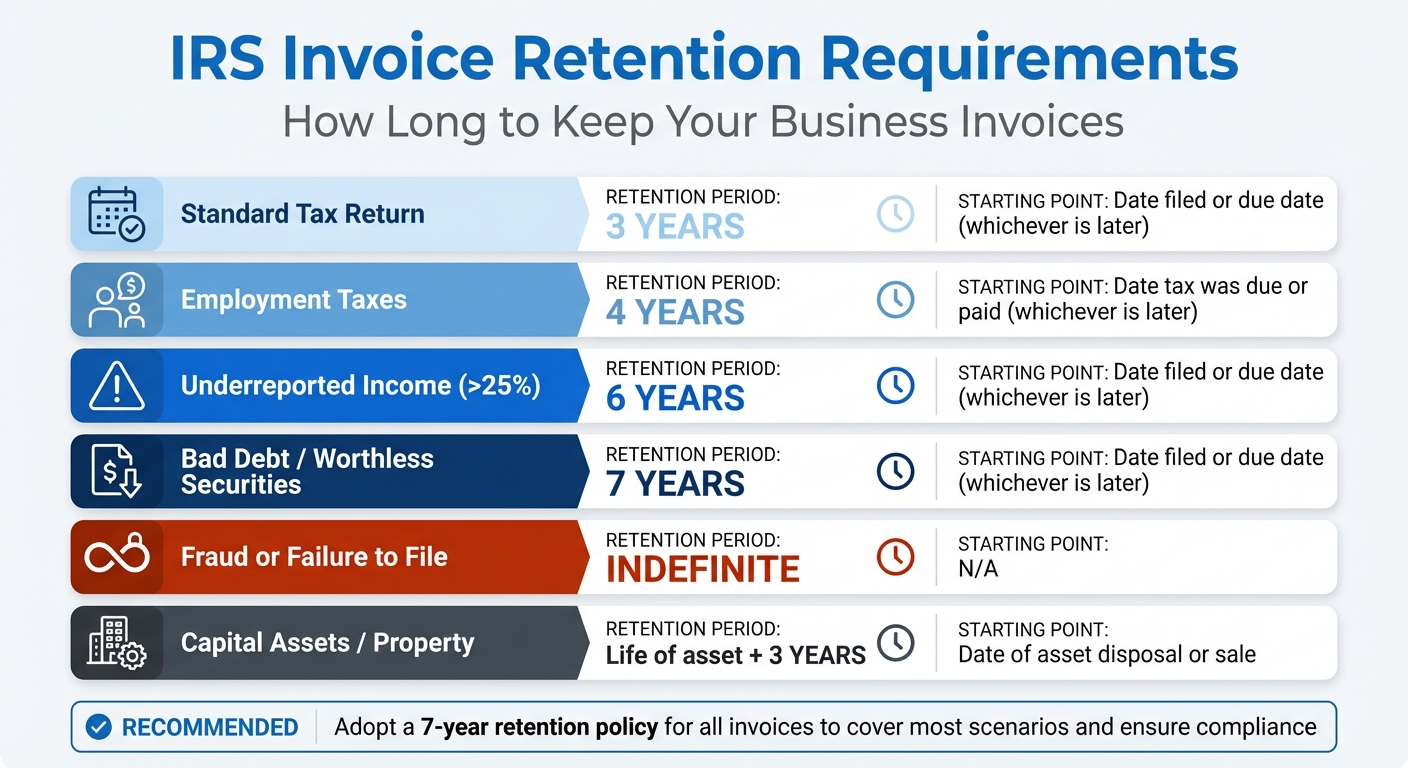
The IRS has specific rules for how long you should keep invoices, and these timelines depend on the statutes of limitation for tax assessments. The clock starts ticking from the later of the filing date or the tax return's due date. Generally, you need to keep invoices for at least three years.
However, there are longer retention periods for certain situations:
- If you underreport your gross income by more than 25%, keep records for six years.
- For bad debt deductions or worthless securities, retain records for seven years.
- Employment tax records should be kept for four years.
For capital assets (like equipment, vehicles, or property), invoices should be kept for the entire time you own the asset and for three years after you sell or dispose of it. These documents are critical for determining the asset's cost basis and any gains or losses when filing taxes. If fraud or failure to file a return is involved, there’s no statute of limitations, meaning records must be kept indefinitely.
| Situation | Retention Period | Calculation Starting Point |
|---|---|---|
| Standard Tax Return | 3 Years | Date filed or due date (whichever is later) |
| Employment Taxes | 4 Years | Date tax was due or paid (whichever is later) |
| Underreported Income (>25%) | 6 Years | Date filed or due date (whichever is later) |
| Bad Debt / Worthless Securities | 7 Years | Date filed or due date (whichever is later) |
| Fraud or Failure to File | Indefinite | N/A |
| Capital Assets / Property | Life of asset + 3 years | Date of asset disposal or sale |
To simplify compliance, consider adopting a seven-year retention policy for all electronic invoices. This approach covers most scenarios and reduces the risk of non-compliance.
Key IRS Guidelines You Must Follow
Beyond retention periods, the IRS has strict guidelines for how records should be maintained. Under IRC Section 6001, taxpayers are required to keep records that fully support the figures on their tax returns. These records must be accessible, accurate, and easy to reproduce in case of an audit. Thanks to the E‑Sign Act, digital copies hold the same legal weight as paper originals, provided they meet IRS standards.
When it comes to digital storage, Revenue Procedure 97‑22 outlines how to convert paper invoices into a digital format. Your system must:
- Accurately capture all data from the original paper records.
- Index records for quick and easy retrieval.
- Produce clear and readable hard copies when needed.
For invoices created digitally (“born-digital”), Revenue Procedure 98‑25 applies. This ensures that records generated by automated accounting systems remain retrievable and properly documented. These guidelines make it easier to manage a mix of paper and electronic records.
Certain expenses, like meals, travel, and business vehicle costs, require extra attention. Under IRC Section 274, these categories demand detailed, contemporaneous records that document the amount, date, location, and business purpose of each expense. Unlike other areas where the "Cohan Rule" might allow estimated expenses, these categories require precise documentation - approximations or reconstructed records won’t cut it.
6 Requirements for Electronic Invoice Storage
Revenue Procedure 97-22 outlines six essential requirements your electronic storage system must meet to comply with IRS regulations. These rules apply whether you're scanning paper invoices or managing digital records from the start. Following these guidelines not only helps you avoid penalties but also ensures your records are audit-ready. Here's a breakdown of the six key requirements based on Revenue Procedure 97-22.
Accurate Transfer and Indexing
Your digital copies must be exact replicas of the original invoices, preserving all text, graphics, logos, and formatting. A blurry scan or missing details won't pass IRS standards. For text-based documents, a scanning resolution of 300 DPI is typically recommended. If your invoices include color-coded details - like highlighted payment terms - opt for color scanning to retain all critical information.
Beyond accurate imaging, your system must include a searchable index, allowing you to retrieve invoices by details such as invoice number, vendor, date, or amount. Avoid simply dumping PDFs into folders. Instead, use structured data fields. For example, a consistent file-naming convention like "YYYY-MM-DD_Vendor-Name_Amount.pdf" can help. Additionally, AI-powered tools can auto-extract key details like invoice numbers, dates, and totals into formats like Excel or CSV for easier management and retrieval.
Legible Reproduction and Access Controls
It's not just about storing invoices; you need to ensure they can be quickly retrieved and reproduced in a readable format. Your system must be capable of producing legible hard copies within minutes. To verify this, test the system regularly - choose a random vendor's invoice at least once every quarter to confirm it can be retrieved, exported, and printed without issues.
Security is also a top priority. Protect records from unauthorized access, tampering, or destruction by implementing role-based permissions and maintaining audit trails that log access and modifications. Regularly back up your data offsite and test the restoration process to ensure everything works as expected.
Retention and Quality Assurance
Once invoices are digitized and indexed, it's crucial to ensure their long-term accessibility and accuracy. IRS regulations require records to be accessible and legible for the entire statutory retention period, which varies depending on your tax circumstances. Use stable file formats like PDF/A for archiving, as these are designed for long-term preservation and compatibility with future technologies.
To maintain quality, establish a QA process. Randomly sample 5–20% of scanned batches and compare them side-by-side with the originals to confirm clarity and completeness. Create a standard operating procedure (SOP) that outlines responsibilities, resolution standards, and sampling methods. After scanning, wait at least 30 days before destroying paper originals to allow time for error detection. Keep a destruction log to document what was disposed of, when, and by whom.
How to Set Up a Digital Invoice Storage System
Setting up an efficient digital invoice storage system that aligns with IRS requirements doesn't have to be complicated or costly. With the right tools and a few strategic decisions, freelancers and small business owners can create a system that's both compliant and easy to use. The goal is to meet IRS guidelines for electronic records while ensuring the system remains practical for everyday needs.
Choosing File Formats and Backup Solutions
PDF/A is the best choice for long-term storage. This format is specifically designed for document preservation, ensuring that your invoices remain accessible over the years. As David Harding, Founder of Invoice Data Extraction, emphasizes:
"PDF/A is preferred for archival purposes."
For structured e-invoices, like those in EDI or XML formats, it's essential to retain the original machine-readable format to comply with Revenue Procedure 98-25.
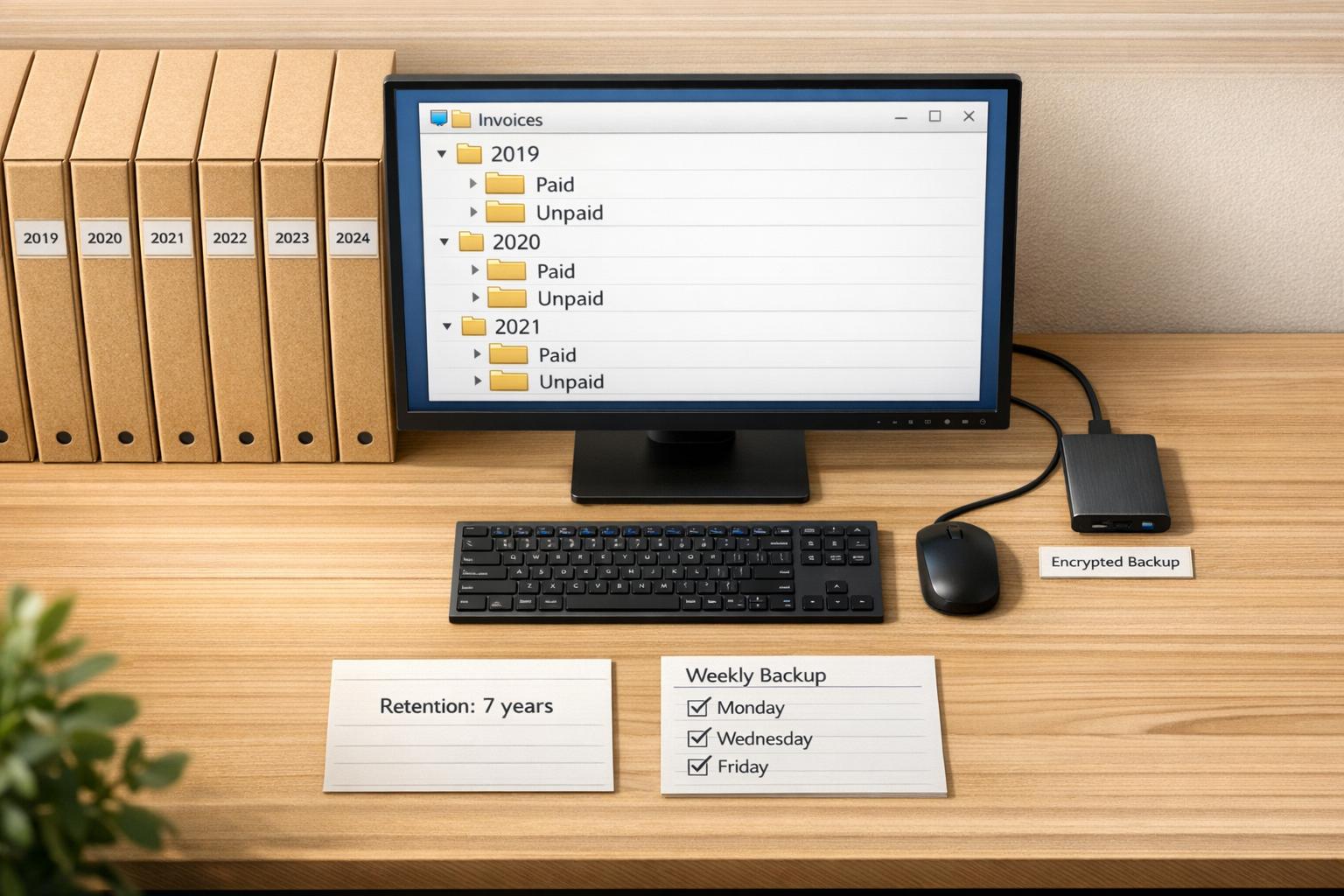
When it comes to backups, use a dual approach: cloud storage combined with a local backup, such as an external hard drive or network-attached storage (NAS). It's also important to regularly test your backups by retrieving and opening invoices from a random month to ensure they can be accessed without issues.
Once your files are securely stored, the next step is to protect your system through encryption and audit trails.
Implementing Encryption and Audit Trails
Encryption and audit trails are critical for safeguarding your records and meeting IRS standards. According to Revenue Procedure 97-22, you need "reasonable controls" to prevent unauthorized access, changes, or destruction of your records. Many accounting platforms already include encryption, securing data both at rest and during transmission.
Track every access and modification to your invoices, noting who made the changes and when. Assign unique logins to users - shared passwords are not acceptable - and use role-based access controls to limit who can modify or delete records. Additionally, link each invoice in your accounting software to its original source document. This creates a clear, traceable path from your tax return back to the corresponding invoice. And when sharing invoices with clients or vendors, always use encrypted channels to ensure the security of the data in transit.
With your security measures in place, the next priority is organizing your invoices for easy retrieval.
Organizing Invoices for Quick Retrieval
A clear and consistent naming convention is essential for staying organized - especially during an audit. Use a format like YYYY-MM-DD_VendorName_InvoiceNumber_$Amount.pdf, so you can quickly search by date, supplier, or amount. For example: 2026-03-15_OfficeDepot_INV-8472_$347.82.pdf.
Structure your files by tax year, with subfolders for quarters or expense categories such as Cost of Goods Sold, Travel, or Utilities. To make retrieval even faster, maintain a master spreadsheet with hyperlinks to each file. This index should include details like the date, vendor, amount, and category, making it searchable by multiple criteria - an IRS requirement. Additionally, AI tools can streamline this process by automatically extracting key details from invoices into Excel or CSV files, saving time and reducing errors.
Physical Invoice Storage and Disposal Methods
Even with a reliable digital system, many businesses still hold on to paper invoices. Whether these documents are kept temporarily before scanning or retained for specific purposes, it's essential to protect them from unauthorized access and physical damage. Proper storage and disposal practices ensure that physical records remain secure until they are digitized and safely discarded.
Secure Storage for Physical Invoices
To safeguard paper invoices, store them in locked filing cabinets or other secure areas to prevent unauthorized access or tampering. Keep these documents in cool, dry environments to avoid issues like ink fading or moisture damage. For better organization, arrange invoices by tax year and further divide them by categories - such as quarters or expense types. This setup not only speeds up retrieval during audits but also ensures a clear distinction between business and personal records.
When and How to Digitize Paper Invoices
According to IRS Revenue Procedure 97-22, paper originals can only be destroyed after your digital storage system meets six compliance standards: accurate transfer, indexing, retrieval capability, quality assurance, access controls, and proper retention. Before disposing of the originals, confirm that scanned copies are legible and complete. As an added precaution, implement a 30-day waiting period after scanning and conduct random spot-checks on 10–20% of the copies to catch any errors.
David Harding, Founder of Invoice Data Extraction, highlights the importance of compliance:
"The original paper invoice can be destroyed only after you have verified the digital copy satisfies all six Revenue Procedure 97-22 requirements."
For invoices with unique features like embossed seals or handwritten notes, hold onto the originals until you are sure the digital version captures these details accurately.
How to Properly Dispose of Paper Invoices
Once you're confident that your digital copies are compliant and the retention period has expired, dispose of the paper invoices securely. Use cross-cut shredding or hire NAID-certified services rather than standard recycling to protect sensitive details like vendor account numbers and payment information.
Additionally, maintain a destruction log. This log should include the disposal date, the specific batch or date range of destroyed invoices, and the name of the person authorizing the process. Such records can serve as evidence if the IRS ever questions your document management practices. For invoices related to capital assets, like equipment or property, retain them for the asset's entire lifespan plus the required retention period after its disposal.
Conclusion
Storing invoices in a way that aligns with IRS requirements is straightforward when your system adheres to their standards. Whether you opt for digital solutions, physical files, or a mix of both, your records must remain secure and easy to access. The foundation of compliance lies in keeping your documents organized, readable, and ready to produce within a few business days if an audit occurs.
A smart approach is adopting a 7-year retention policy, which covers most situations, including issues like underreported income or bad debt deductions. This strategy simplifies record-keeping and ensures you're prepared even when the usual 3-year rule isn't enough. For capital assets like equipment or property, keep records for the entire lifespan of the asset plus the required retention period. These practices create a strong defense in any IRS review.
In 2024, IRS audits resulted in over 505,000 cases and more than $29 billion in additional taxes. As David Harding, Founder of Invoice Data Extraction, wisely states:
"Every IRS audit comes down to one question: can you prove what you reported?"
Make sure your digital invoices are correctly indexed and scanned, with secure backups in place. For paper records, maintain a destruction log for any shredded documents. These measures ensure your invoice storage system is secure, compliant, and ready for any audit, protecting both your deductions and financial stability.
For freelancers and small business owners, tools like Paid on Time simplify invoice management by helping create agreements, secure payment methods, and process charges with a single click. A well-maintained storage system doesn't just meet IRS rules - it also protects your financial health for the long haul.
FAQs
What counts as an IRS-acceptable digital invoice?
An IRS-approved digital invoice needs to be a clear, complete, and accurate copy of the original document. It should include key details such as the date, amount, vendor information, and a clear explanation of the business purpose. On top of that, it must comply with IRS rules for electronic recordkeeping, which cover proper retention and easy accessibility of records.
What should I do if I can’t find an invoice during an audit?
If an invoice goes missing during an audit, you can try to rebuild it using supporting documents such as bank statements, canceled checks, or receipts. Be sure to document all your attempts to locate the original record and provide a clear explanation for why it’s unavailable. To prevent similar problems in the future, stick to IRS guidelines for storing invoices - whether electronically or physically - and maintain well-organized, detailed records to stay compliant.
How should I store invoices for equipment or other capital assets?
The IRS advises holding onto invoices for equipment or capital assets for at least 3 years after filing your tax return. However, if your income was underreported by more than 25%, you should keep them for 6 years. For assets, it's important to maintain records for the entire time they're relevant to your taxes. Using digital storage is fine, as long as it meets IRS standards for accuracy and retention.