9 Key Parts of a Professional Invoice
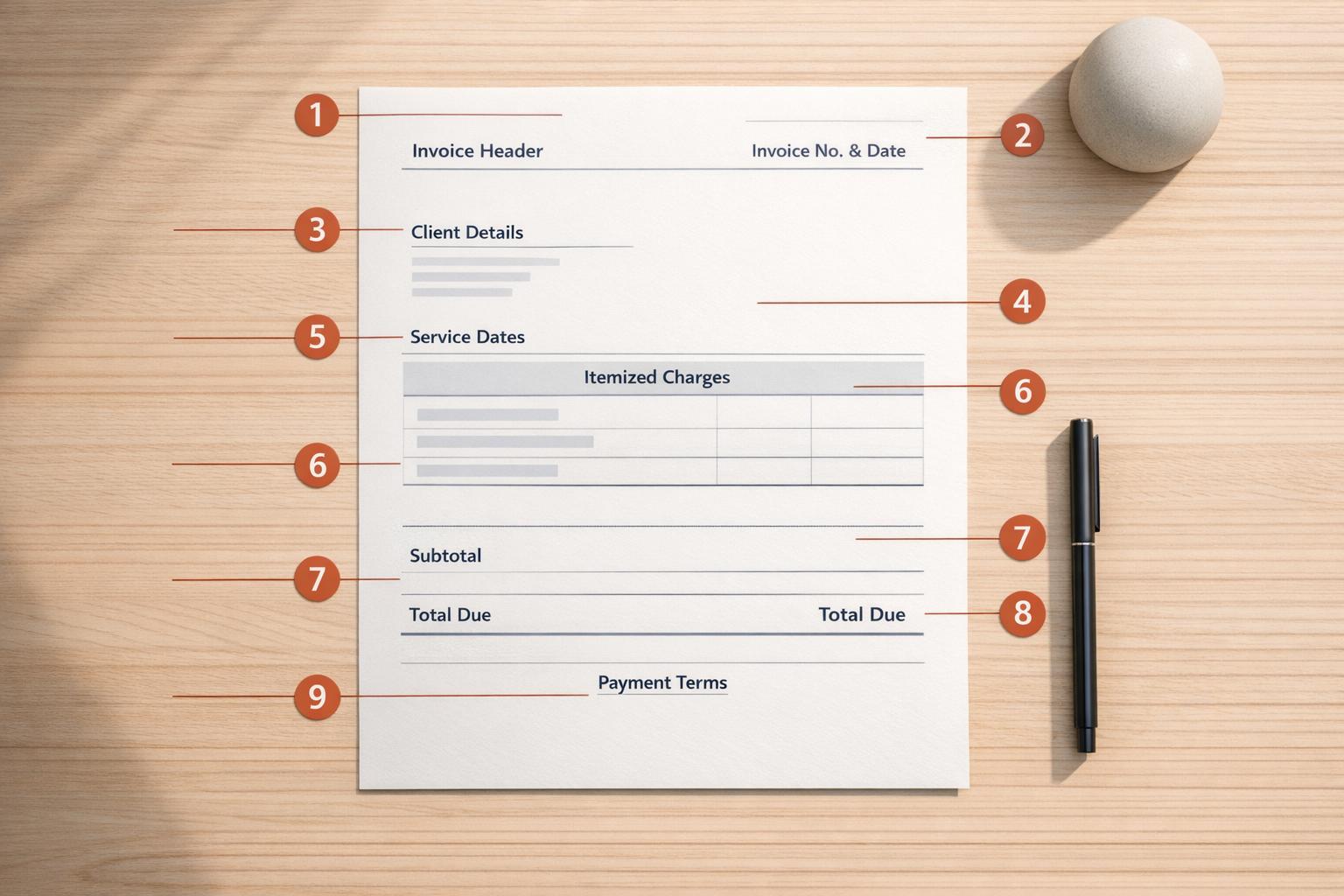
9 Key Parts of a Professional Invoice
Professional invoices are crucial for ensuring timely payments and maintaining smooth cash flow. A poorly crafted invoice can lead to delays, confusion, and even disputes. To avoid these issues, every professional invoice should include these nine essential elements:
- Clear Header: Clearly label the document as an invoice, include your logo, business name, address, and contact details.
- Invoice Number: Assign a unique, sequential number for tracking and compliance.
- Your Business Information: Provide accurate details like your registered business name, address, and tax identification number.
- Client Information: Include the client’s full legal name, address, and any relevant purchase order numbers.
- Invoice Date and Payment Due Date: Specify when the invoice was issued and the payment deadline.
- Itemized List of Services or Products: Break down charges with clear descriptions, quantities, rates, and totals.
- Taxes, Fees, and Subtotals: Show calculations for taxes, discounts, and fees separately for transparency.
- Total Amount Due: Highlight the final amount owed in bold or larger text.
- Payment Terms and Accepted Methods: Define payment deadlines, accepted methods, and any late fee policies.
Including these elements ensures clarity, reduces errors, and speeds up payment processing. A well-structured invoice not only helps you get paid faster but also builds trust with your clients. For more tips on managing your finances, check out our latest payment insights and updates.
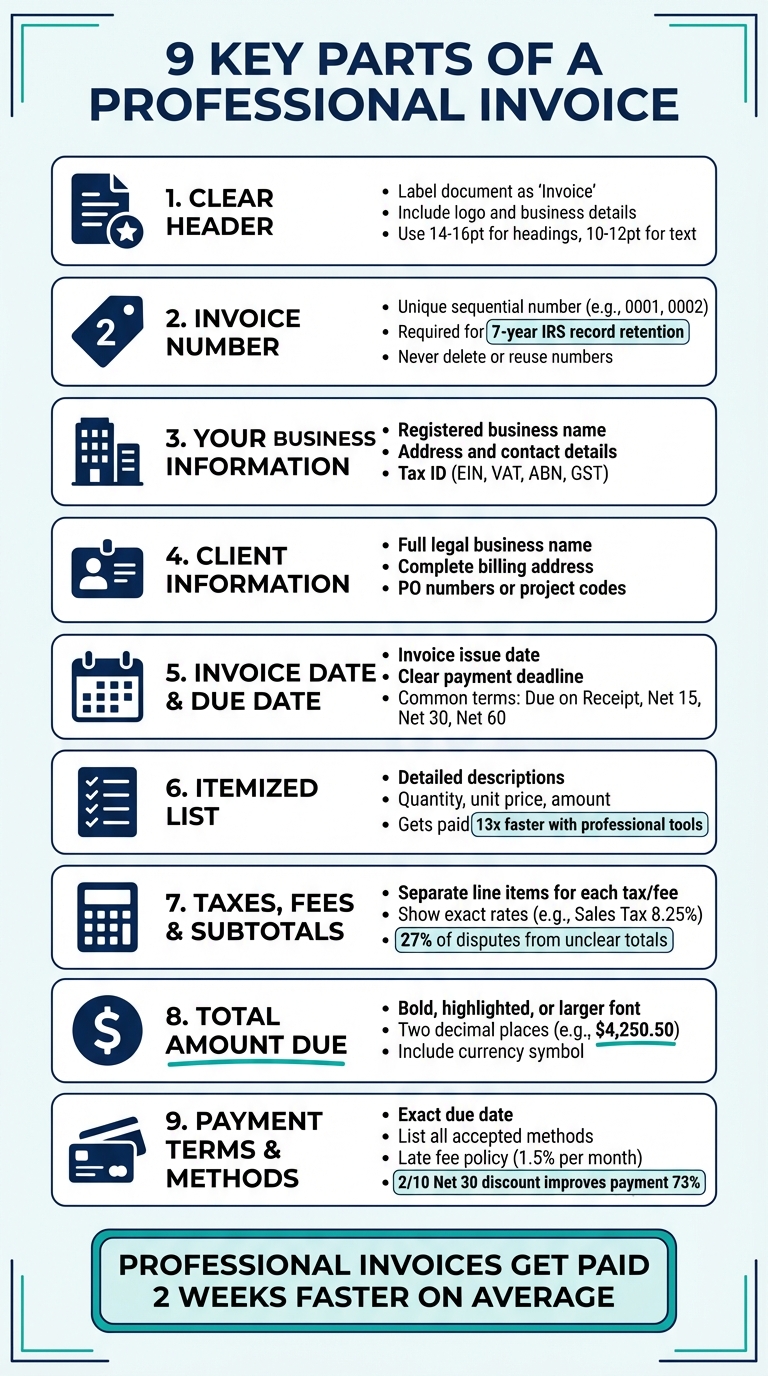
9 Essential Elements of a Professional Invoice Checklist
How to Create a Business Invoice in Excel - Tutorial
sbb-itb-66f4c95
1. Clear Header
Start your invoice with the word "Invoice" prominently displayed at the top. This straightforward label helps avoid any mix-ups with quotes, estimates, or receipts - errors that could delay payment processing.
Marcelo, Founder of pdf noodle, explains: "The invoice header, or billing header, sets the professional tone for your entire billing document. It directly influences your client's perception of credibility and trustworthiness."
A polished header gives your client confidence that they are reviewing an official request for payment. Be sure to include key details like your company logo, legal name, registered address, contact information, and, if applicable, your EIN or other tax identifiers.
For a professional look, use high-contrast fonts and maintain plenty of white space. Stick to a font size of 14–16pt for headings and 10–12pt for the main text, and limit your design to no more than two fonts to keep it clean and easy to read.
If your client has provided a Purchase Order (PO) number or reference code, include it in the header. This small addition can help streamline the approval process.
A strong, well-organized header sets the tone for the rest of your invoice, ensuring clarity and professionalism.
2. Invoice Number
Every invoice needs a unique identification number - a key detail that serves as a precise reference for your transactions. This number ensures you can quickly locate a specific invoice and address any client inquiries.
"When a client says 'I paid invoice...' you need a number to match against. Without numbering, reconciliation becomes guesswork." - InvoiceQuickly
The IRS requires businesses to retain invoice records for at least seven years, and sequential numbering plays a crucial role during tax time. Tax authorities rely on these unique identifiers to confirm that all revenue is accounted for and your records are complete. Missing or skipped numbers in the sequence can raise red flags during audits, as they may indicate missing or deleted invoices.
Consistency in numbering formats is equally important to avoid audit complications. For freelancers and small businesses, simple sequential numbering (e.g., 0001, 0002, 0003) works well. For those managing multiple clients or projects, adding prefixes can help. For instance, use "CLT-001" for client-specific tracking or "20260409-001" to include the date in the invoice number. Leading zeros (e.g., 0001) are a smart way to maintain uniform formatting as your business scales to hundreds or even thousands of invoices.
It's essential never to delete or reuse an invoice number. If you need to correct an error, issue a uniquely numbered credit note and create a new invoice. This approach keeps your records clean, avoids confusion, and ensures compliance with tax and accounting standards.
3. Your Business Information
The invoice header is where your business information takes center stage, serving as the first impression and ensuring clarity for both legal and practical purposes. Including accurate details here isn’t just about looking professional - it’s essential for compliance and ensuring smooth payment processing. The IRS mandates that all business records must clearly identify their source, and incomplete or unclear information can lead to frustrating payment delays while clients seek clarification. A well-structured header not only legitimizes your invoice but also helps clients process it faster.
Make sure to clearly list the following details in your invoice header:
- Registered business name
- Business address (or a PO Box if you work from home and want to maintain privacy)
- Professional email address (specifically for billing inquiries)
- Phone number
- Website URL
"Think of your invoice as a self-contained document. The recipient should be able to understand exactly what they owe, what it's for, and how to pay - without needing to email you for clarification. Every missing field is a potential friction point between you and your money." Using an agreement-backed payment platform can help eliminate these friction points by formalizing terms upfront. – OwnedWork
Additionally, include any required tax identification numbers. For instance, businesses in the United States should provide an EIN (or SSN for sole proprietors). Other regions will require their specific tax identifiers, such as VAT numbers in the UK, ABN in Australia, or GST numbers in countries like Canada and India.
Accuracy is critical here. Ensure all the information matches your official tax and banking records precisely. Many large companies use automated systems that will reject invoices over even small discrepancies, causing delays as you correct and resubmit. Including a professional logo in the header is also a good idea - it adds visual credibility and makes your invoice look more official, helping it stand out from informal payment requests.
A well-organized business header sets the stage for the next essential element: your client’s details.
4. Client Information
After documenting your business details, it's crucial to capture accurate client information. Start by including your client's full legal business name - not just a contact person's name. Many automated accounts payable systems will reject invoices if the name doesn't perfectly match official records.
Include the complete billing address, as well as the email and phone number for the accounts payable department. If you're handling B2B transactions, particularly with clients in the European Union, don't forget to add the client's VAT number or tax ID. This ensures compliance with tax laws and helps you apply reverse-charge rules correctly.
"Getting the client details right matters more than you think. An invoice addressed to the wrong entity or department often gets bounced back, adding days or weeks to your payment timeline." - InvoiceQuickly
To further streamline the process, add an attention line, such as "Attn: Accounts Payable" or "Attn: Sarah Johnson", and include any required Purchase Order (PO) numbers or project codes. This step prevents unnecessary delays.
Lastly, double-check that all client details align with official records and your contract. This level of precision reduces the risk of processing errors and speeds up payment timelines. Getting these details right sets the stage for smooth invoicing and a quicker payment process.
5. Invoice Date and Payment Due Date
The invoice date is where the clock starts ticking on your payment timeline. Whether you’re working with Net 15, Net 30, or a "Due on Receipt" arrangement, this date sets the expectation for when payment is required. To avoid delays, send your invoice immediately after completing the job - every day you wait pushes back the payment window.
The payment due date is equally important. It eliminates any confusion by providing a firm deadline. Without it, your invoice might get lost in the shuffle of accounts payable, leaving you waiting until it’s convenient for the client to pay. Use bold text or a larger font to make this date stand out.
"Any delay between service completion and invoicing delays your payment." - Pronto Invoice
From a tax and accounting standpoint, the invoice date plays a key role in determining when revenue is recorded, especially for businesses using accrual accounting. Both dates also serve as crucial legal references in case of payment disputes.
When setting payment terms, consider what’s standard for your industry:
- Due on Receipt: Ideal for new clients or small projects.
- Net 15: Often used by freelancers.
- Net 30: A common choice for B2B transactions.
- Net 60: Typical for large corporations.
To save time and reduce errors, invoicing software can automatically calculate due dates for you.
Here’s a compelling stat: businesses that send invoices promptly and consistently get paid, on average, two weeks faster than those that rely on informal or delayed billing practices.
With these dates clearly outlined, you’re ready to dive into presenting an organized, itemized breakdown of your services in the next section.
6. Itemized List of Services or Products
Break down every charge into separate line items, ensuring each service or product is clearly described with its quantity, rate, and total.
"An itemized invoice is a detailed billing document that breaks down every service, product, or billable hour into separate line items." - SolidGigs
Clarity is key. A vague description like "Design work" won't cut it. Instead, be specific: "Logo design - 3 concept options with 2 rounds of revisions". Using detailed descriptions not only avoids confusion but also reassures clients that you’ve delivered exactly what was agreed upon. Stick to the language used in your original contract or proposal to make verification simple for the client’s accounts payable team.
For larger or more intricate projects, list deliverables or milestones as separate entries rather than bundling them together. If billing hourly, include the dates the work was done and specify the unit - whether it’s hours, words, pages, or sessions. This level of detail reduces ambiguity and helps prevent payment disputes.
Here’s an example of a well-structured itemized list:
| Description | Quantity | Unit Price | Amount |
|---|---|---|---|
| Homepage Redesign - 5 revisions included | 1 | $3,500.00 | $3,500.00 |
| Blog Post Writing - SEO optimized, 1,500 words | 4 | $150.00 | $600.00 |
| Social Media Graphics - Instagram and Facebook formats | 10 | $50.00 | $500.00 |
Many corporate accounts payable departments require itemized invoices to allocate expenses across various departments or budgets. A detailed breakdown not only reflects professionalism but also speeds up payment processing. In fact, data from tens of thousands of users shows that using professional invoicing tools can help freelancers get paid up to 13 times faster.
A thorough itemized list also sets the stage for clear tax and fee breakdowns in the next section.
7. Taxes, Fees, and Subtotals
Once you've outlined your services, break down the calculations clearly. Start with the subtotal, which is the total of all line items before taxes or fees. From there, apply any discounts to the subtotal, calculate taxes on the discounted amount, and then add any shipping or additional fees. This approach avoids overcharging and ensures your calculations are easy to follow.
Make sure to list taxes and fees separately, clearly specifying the tax type and rate. For example, you might write, "Sales Tax (8.25%): $336.00." In states like Tennessee (9.55%) or Louisiana (9.52%), clients expect the exact rate to be detailed. For jurisdictions with multiple tax rates, combine them first. For instance, a 6% state tax plus a 2.25% local tax equals a total of 8.25%.
Providing clear calculations reduces errors and strengthens invoice transparency.
"Rounding intermediate values (like individual line items) can cause the total to be off by a few cents, which looks unprofessional and can cause reconciliation issues." - InvoiceKits
To avoid these small discrepancies, keep full precision throughout your calculations and only round the final total to two decimal places. This minimizes errors that could delay payment. Consider this: 27% of invoice disputes arise from unclear totals, and 21% of errors come from manual miscalculations. Using automated invoicing tools can cut these errors by 30% and help you get paid up to 14 days faster.
For added clarity, list each tax (like "Sales Tax at 8.25%") and fee (such as "FedEx Ground Shipping & Handling") on separate lines. This level of transparency not only helps build trust but also speeds up the approval process, paving the way for the final invoice total in the next section.
8. Total Amount Due
The total amount due is the most critical figure on your invoice - it’s what your client needs to pay. To ensure it stands out, use bold text, increase the font size, or place it in a highlighted box. These visual cues help draw immediate attention to the payment amount.
Place the total at the bottom of your financial summary, right after the subtotal, taxes, and any additional fees. This positioning signals that it’s the final amount owed. Always format the total with two decimal places (e.g., $4,250.50) for a professional and consistent look. Right-aligning the figure within its column further enhances readability.
"Make the total impossible to miss. Bold it, increase the font size, or place it in a highlighted box. The faster a client can see what they owe, the faster they'll pay." – InvoiceQuickly
For international or multi-currency invoices, include the currency symbol (e.g., USD, GBP, EUR) directly next to the total. If the invoice covers multiple projects or phases, list project-specific subtotals before the grand total to provide a clear cost breakdown. This transparency helps clients understand exactly what they’re paying for.
An easy-to-spot total reduces confusion and speeds up the payment process. By eliminating ambiguity here, you can minimize delays and streamline your invoicing workflow.
9. Payment Terms and Accepted Payment Methods
When it comes to getting paid, clarity is everything. By outlining clear payment terms and providing specific details, you can set the right expectations and ensure quicker payments.
Start by defining a precise payment deadline. Instead of using vague terms like "Net 30", include an exact date (e.g., "Net 30 – Due May 9, 2026") to avoid confusion. Common payment terms include Due on Receipt (immediate payment), Net 15 (15 days), and Net 30 (30 days). For smaller projects or new clients, "Due on Receipt" can help maintain steady cash flow. On the other hand, established B2B partnerships often use "Net 30", though these invoices are typically paid in about 36 days on average.
Be sure to list every payment method you accept. Options might include bank transfers, credit or debit cards, ACH, PayPal, or even checks. Offering multiple choices can minimize payment delays. Digital payment platforms like Stripe (charging 2.9% + $0.30 per transaction) and PayPal (around 2.99%) make the process faster and more convenient. While there are fees involved, the speed of payment often makes up for the cost.
To encourage faster payments, consider offering incentives such as "2/10 Net 30" (a 2% discount if paid within 10 days). This approach has been reported by 73% of businesses to improve payment cycles. Additionally, including a late fee policy on your invoice - typically around 1.5% per month - can motivate clients to pay on time. In fact, simply stating a late fee policy can result in payments being made 15% faster.
Tools like Paid on Time can simplify the process further by securing payment methods upfront and allowing one-click charges once work is complete. This not only streamlines invoicing but also reduces disputes, making well-defined payment terms an essential part of smooth financial operations.
Conclusion
A professional invoice serves as more than just a payment request - it’s a formal record of the transaction, a legal document, and a tool for tax reporting, all rolled into one. By including all nine essential elements, your invoice becomes a clear and effective way to communicate what’s owed, what it covers, and how to pay.
When your invoice is detailed - covering everything from itemized descriptions to clear payment instructions - you reduce the chance of delays and ensure smoother processing. Missing key details, on the other hand, can lead to frustrating payment setbacks. A well-crafted invoice doesn’t just sit in a pile; it moves to the front of the line for quicker payment.
"The easier you make it to pay, the faster you'll get paid".
Tools like Paid on Time can simplify this process even further. By securing payment methods in advance and enabling one-click charges after completing the work, these platforms eliminate the need for manual invoicing and reduce the likelihood of disputes. Instead of chasing payments, you can concentrate on delivering quality work while maintaining a steady cash flow.
A complete invoice, issued promptly after finishing a project, builds trust, ensures compliance, and accelerates payment timelines. Highlight the total amount clearly, include a specific deadline, and make the payment process as straightforward as possible. These practices not only secure timely payments but also underscore your professionalism and commitment to your business’s financial health.
FAQs
What should I do if I made a mistake on an invoice?
If you spot an error on an invoice, address it quickly and professionally. For invoices already sent, you’ll need to issue either a credit note or a revised invoice to fix the mistake. If the invoice hasn’t been sent yet, simply make the necessary changes before delivering it to the client. Clear communication is key - always inform the client in writing about the correction and keep a record of all changes to maintain transparency.
How do I choose the right payment terms for my clients?
When setting payment terms, aim to strike a balance between getting paid promptly and nurturing strong client relationships. For smaller projects or repeat clients, shorter terms like Due on Receipt or Net 15 can be effective. These encourage faster payments without seeming unreasonable.
It's essential to tailor your terms based on factors like your industry, the size of your client, and the scope of the project. Including clear deadlines and adding clauses for late fees can help ensure payments stay on track. Offering multiple payment options - like credit cards, ACH transfers, or digital wallets - can make the process more convenient for clients, increasing the likelihood of on-time payments.
The key is to balance payment speed, client convenience, and what’s typical for your industry to achieve the best results.
What invoice details matter most to avoid payment delays?
To avoid payment delays, make sure your invoices include all the essentials. Start with complete client and business details - this means names, addresses, and contact information. Add a unique invoice number for easy tracking. Don’t forget to include clear payment instructions, specifying how and where to pay. Lastly, outline explicit payment terms, such as due dates and any late fee policies. These steps help keep everything clear and make the payment process smoother.