How to Choose Tax Software for Freelance Work
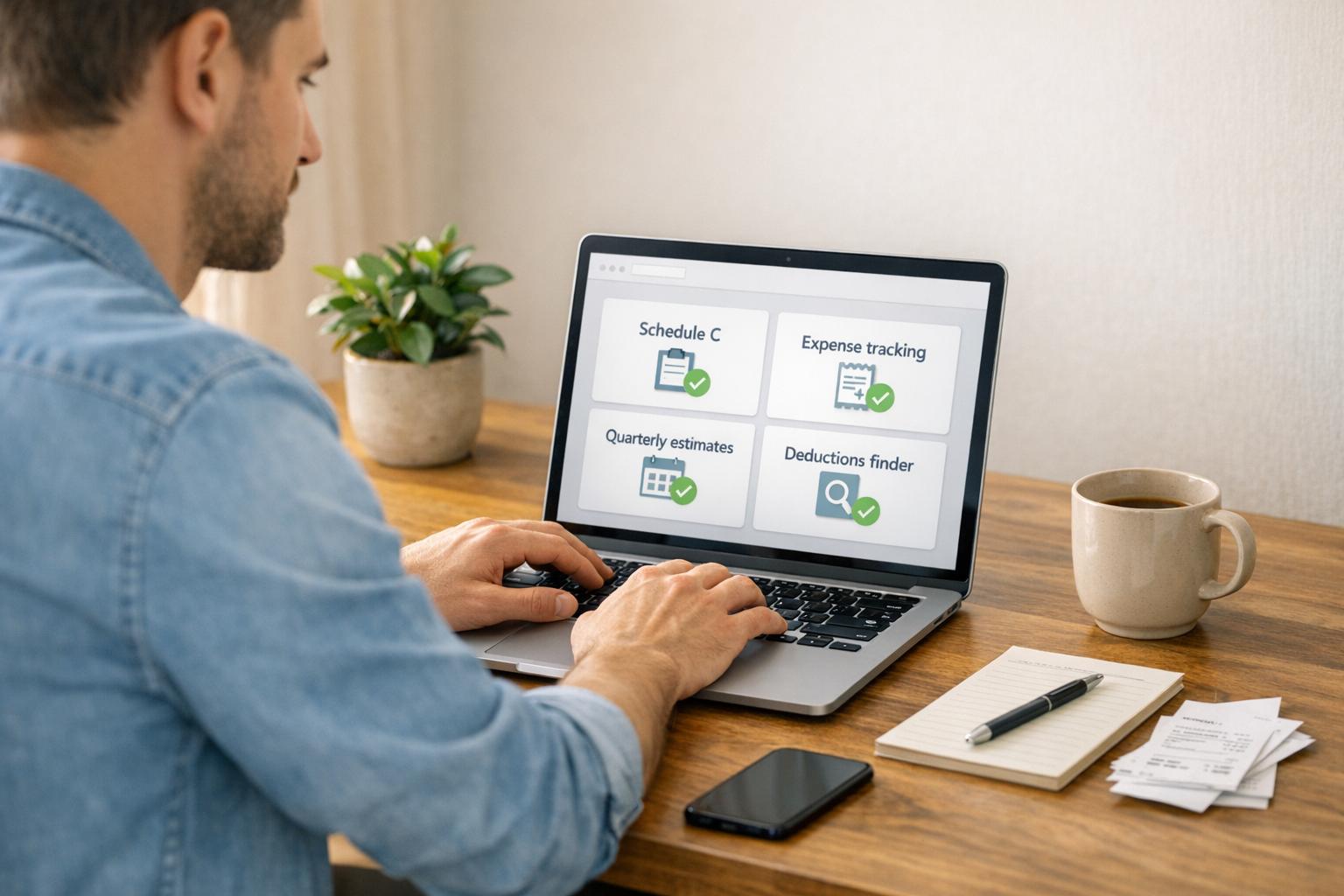
How to Choose Tax Software for Freelance Work
Freelancers face unique tax challenges, from tracking expenses to calculating quarterly payments and filing the right forms. The right tax software can save you time, reduce errors, and help you claim every deduction you're eligible for.
Here’s what you need to know:
- You’ll need specific forms: Freelancers typically file Schedule C (business profits/losses) and Schedule SE (self-employment tax). Payments from clients often come with 1099-NEC or 1099-K forms.
- Quarterly taxes are required: If you owe $1,000+ in taxes, you must pay quarterly. Deadlines for 2026 are April 15, June 15, September 15, and January 15, 2027.
- Expense tracking is key: Deductible costs include home office expenses, mileage (72.5¢ per mile for 2026), software subscriptions, and more.
- Choose software tailored to freelancers: Look for tools that handle Schedule C, track deductions, calculate quarterly payments, and integrate with payment platforms.
Quick Tip: Many free tax software options don’t support freelancer-specific needs like Schedule C, so expect a paid tier. Investing in the right software can save you hours and maximize your deductions.
Keep reading to learn how to pick the best tool for your freelance taxes.
Best Tax Software for Self Employed || Top 6 Tax Software for Self Employed (Full Guide)
sbb-itb-66f4c95
Identify Your Freelance Tax Requirements
Before picking tax software, it’s important to understand your specific filing obligations. What you owe and how you file depends on your earnings, the nature of your work, and your business structure. Knowing these details helps you select software that meets your needs. Pay close attention to areas like expense tracking, quarterly tax payments, and filing requirements.
Track Business Expenses and Deductions
The IRS allows freelancers to deduct expenses that are both ordinary (common in your field) and necessary (helpful for your business). For example, a web developer can deduct the cost of a React course that enhances coding skills, but not medical school tuition for an unrelated career change. Industry-specific tools like cameras for photographers or Adobe Creative Suite for graphic designers are also deductible, as are platform fees from services like Fiverr, Upwork, or Etsy. Other eligible expenses include software subscriptions, office supplies, and professional development related to your current work. Keeping organized records of these expenses can save freelancers thousands of dollars each year.
"The home office deduction is also often overlooked, but that one is very tricky. According to the IRS, it needs to be a dedicated area - like a separate room, a specific couch you only work on, or a desk you use just for work." - Stan Kosyakovskiy, Managing Principal, ODIS Management Inc
Tax software designed for freelancers often includes tools to identify these deductions. Many use interview-style interfaces tailored to your profession, helping you uncover write-offs you might otherwise miss.
Calculate and Pay Quarterly Taxes
If you expect to owe $1,000 or more in federal taxes for the year, you’re required to make quarterly estimated payments. Unlike traditional employees, freelancers don’t have taxes withheld from their income. This means you’re responsible for paying both income tax and the 15.3% self-employment tax, which covers Social Security and Medicare.
| 2026 Quarterly Payment Deadlines | Income Period | Due Date |
|---|---|---|
| Quarter 1 | January 1 – March 31 | April 15, 2026 |
| Quarter 2 | April 1 – May 31 | June 15, 2026 |
| Quarter 3 | June 1 – August 31 | September 15, 2026 |
| Quarter 4 | September 1 – December 31 | January 15, 2027 |
Setting aside funds in a separate account for taxes can help you stay on track. Many tax software options automatically calculate estimated payments and send reminders about deadlines, helping you avoid penalties for underpayment.
Staying on top of quarterly payments is just as important as tracking deductions when managing your taxes.
Understand Filing Requirements for Your Business Structure
Your business structure determines the tax forms you’ll need and the software tier that can handle them. For most freelancers, the default setup is as a sole proprietor or single-member LLC, which requires reporting income on Schedule C attached to Form 1040. If your net self-employment income is $400 or more, you’re required to file a tax return.
For more complex setups, multi-member LLCs file Form 1065, while S-Corporations use Form 1120-S. If you’re earning over $50,000 annually, S-Corp status might save you money on self-employment taxes, but it also requires formal payroll. Be sure your chosen tax software supports the forms relevant to your business structure.
Choosing the right software ensures you meet filing requirements without unnecessary complications.
Must-Have Features in Tax Software for Freelancers
Freelancers face unique tax challenges, and not all tax software is up to the task. Choosing a tool that doesn’t align with self-employment needs can lead to missed deductions or costly filing errors. The right software should handle everything from tracking diverse expenses to calculating quarterly payments accurately.
Deduction and Expense Tracking Tools
Good tax software for freelancers simplifies expense tracking. Features like OCR (optical character recognition) allow you to scan and store receipts instantly. Even better, integration with your bank and credit card accounts can automatically categorize expenses, saving you hours of manual work.
Mileage tracking is another must-have. Mobile apps with GPS functionality can log your trips in real-time, making it easy to claim mileage deductions. If you work from home, look for tools with home office calculators. These can calculate the deductible portion of expenses like rent, utilities, and insurance based on your workspace’s square footage.
Some platforms also use AI to identify potential deductions by analyzing your spending habits. They can flag industry-specific expenses or subscriptions you might overlook. For added convenience, certain tools let you upload images of forms like 1099-NEC or 1099-K, automatically filling in your income data.
Once you’ve got expense tracking covered, make sure your software integrates with your payment systems.
Integration with Payment and Invoicing Platforms
Freelancers often juggle multiple income streams, so your tax software should connect easily with the platforms you use for payments and invoicing. Direct integration with payment processors can automatically import transactions, eliminating the need for manual entry. This ensures that all your income is accurately recorded.
For example, tools like Paid on Time (https://paidontime.app) generate detailed payment records and receipts when clients pay. Tax software that syncs with such systems can pull in payment data directly, saving time and reducing errors. It can even distinguish between sales income and payment processing fees, which is a game-changer for bookkeeping. If you receive 1099-K forms from third-party networks, integrated software can help reconcile these with your actual bank deposits.
This level of automation matters. In 2024, taxpayers collectively spent more than 7.9 billion hours on federal tax compliance. By automating these processes, you can reclaim valuable time.
Quarterly Tax Calculation and Filing Support
Freelancers who owe $1,000 or more in taxes must make quarterly estimated payments. Tax software that updates quarterly estimates in real-time ensures you avoid underpayment penalties. Look for platforms that generate Form 1040-ES (Estimated Tax Vouchers) for mail-in payments or provide links for electronic filing.
Automated reminders for quarterly deadlines - January 15, April 15, June 15, and September 15 - are essential. Missing these deadlines can result in penalties. Software that tracks your income throughout the year and adjusts estimates as your earnings change offers far more accuracy than static, manual calculations.
Audit Protection and Customer Support
Freelancers often deal with complex filings, so having access to audit assistance and live support can be a lifesaver. Some software includes audit protection in premium plans, giving you access to tax professionals who can represent you if the IRS requests documentation. This can help you navigate audits with minimal stress.
Equally important is responsive customer support. Whether you’re troubleshooting technical issues or need help understanding a tax form, live chat, phone support, or direct access to tax experts can make all the difference - especially during the busy filing season.
"The best system is the one you'll actually consistently use." - Mercury
Reliable support and user-friendly features can make sticking with your chosen software year after year much easier.
How to Evaluate and Select Tax Software
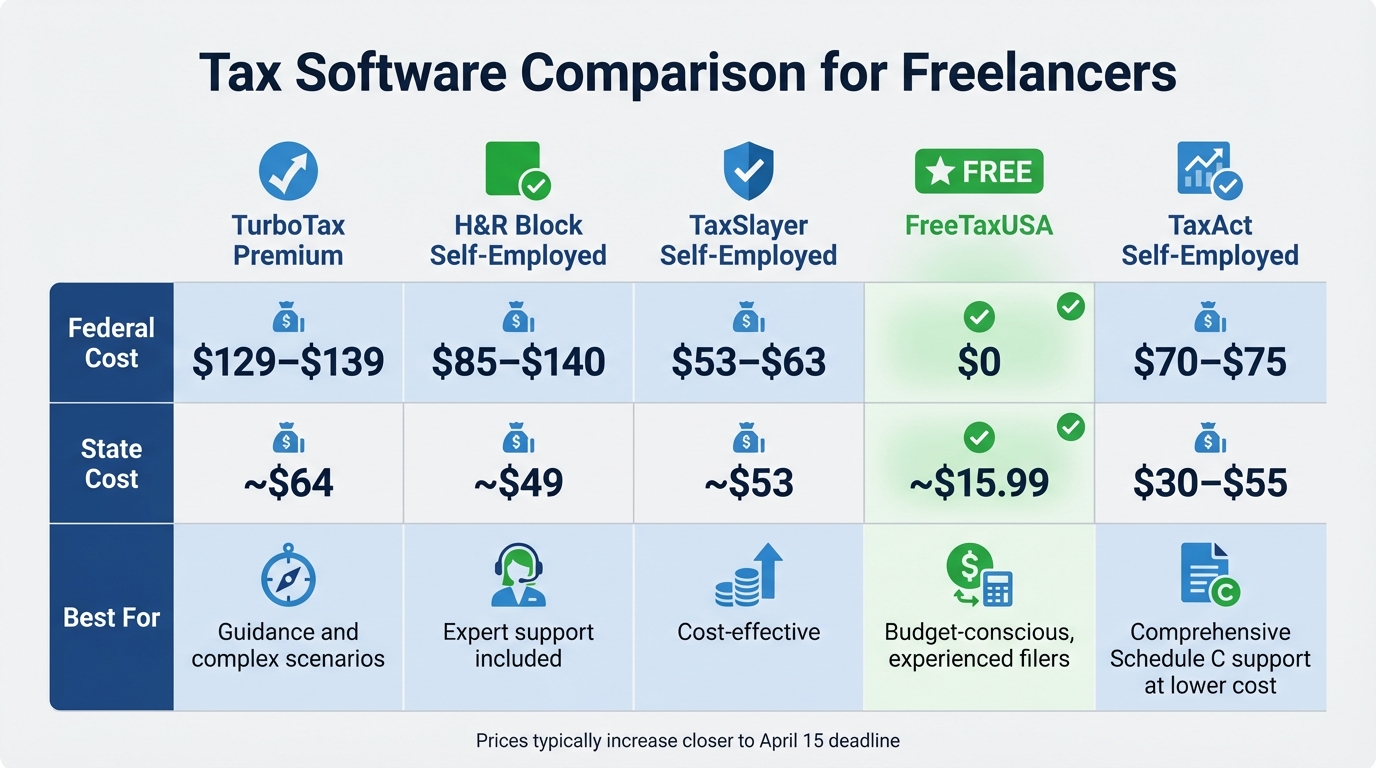
Tax Software Comparison for Freelancers: Features and Pricing Guide
Choosing the right tax software isn’t just about picking a well-known name - it’s about finding the one that best fits your freelance needs. Taking a thoughtful approach can help you avoid unnecessary costs and stress when tax season rolls around.
Review Your Tax Complexity
Start by assessing how complicated your tax situation is. For example, if you’re a sole proprietor filing a Schedule C with straightforward 1099-NEC income, your needs will differ from someone managing S-Corp filings or rental income scenarios. Freelancers also face a 15.3% self-employment tax, so ensuring your software supports the right forms based on your business structure is crucial.
Think about all your income sources. Are you juggling multiple 1099-NECs from various clients? Do you also receive 1099-Ks from payment platforms, have W-2 income from side gigs, or handle cash payments? The more diverse your income streams, the more capable your software needs to be. If cryptocurrency transactions are part of your earnings, check that the software supports Form 8949. And if you’re a traveling freelancer filing in multiple states, you’ll want software that handles this complexity without adding excessive costs.
Don’t forget to evaluate your deductions. While common deductions like home office expenses and mileage are standard, you might also need support for more specialized write-offs, like equipment depreciation or health insurance premiums. If you’ve got investments, make sure the software can accommodate those as well. Keep in mind that while about 37% of tax filers qualify for free versions of major tax software, freelancers with 1099 income often don’t meet the criteria.
Once you’ve identified your needs, testing free trials and exploring user interfaces can help narrow down your options.
Test Free Trials and User Interfaces
Most tax software platforms let you start your return for free, charging you only when you file. This trial period is a great time to see if the software matches your needs - especially for freelancers. Be aware, though, that many free versions will lock your data behind a paywall as soon as you add freelance income or Schedule C deductions.
"The moment you have 1099 income, Schedule C deductions, or quarterly estimated taxes, you need a paid tier." - SmartSMSSolutions
During the trial, check whether the software’s interface works for you. Does it proactively suggest deductions like home office equipment or mileage? If you prefer using your phone, test the mobile app’s functionality - TaxSlayer and Cash App Taxes are known for their smooth mobile experiences. Also, see how easily you can access support features like live chat or screen sharing if you need help partway through your return.
Verify Software Integrations
Good software should integrate seamlessly with the tools you already use, streamlining the process. For example, TurboTax Premium connects directly with QuickBooks, making it easier to import income and expense data without manual entry. If you use payment platforms like Paid on Time, check that your tax software can import transaction records smoothly.
Look for features like automatic form capture, which lets you photograph 1099-NEC or 1099-K forms for instant data entry. Premium tiers of TurboTax and H&R Block include this functionality. For freelancers with cryptocurrency income, integrations with tools like CoinTracker or Koinly can simplify importing Form 8949 data. With freelancing on the rise - expected to reach 86.5 million workers by 2027 - having software that syncs with your existing tools will save time and hassle.
Compare Pricing and Benefits
Finally, weigh the cost of the software against its potential to save you time and maximize deductions. While hiring a tax professional can cost around $600, self-employed tax software typically ranges from $50 to $200. For instance, TurboTax Premium costs about $129–$139 for federal filing (plus $64 per state), while FreeTaxUSA offers free federal filing with Schedule C support and charges roughly $16 per state.
| Software | Federal Cost | State Cost | Best For |
|---|---|---|---|
| TurboTax Premium | ~$129–$139 | ~$64 | Guidance and complex scenarios |
| H&R Block Self-Employed | ~$85–$140 | ~$49 | Expert support included |
| TaxSlayer Self-Employed | ~$53–$63 | ~$53 | Cost-effective |
| FreeTaxUSA | $0 | ~$15.99 | Budget-conscious, experienced filers |
| TaxAct Self-Employed | ~$70–$75 | ~$30–$55 | Comprehensive Schedule C support at a lower cost |
Keep in mind that prices often rise as the April 15 deadline approaches, so locking in your software early - ideally in January or February - can save you money. With the average U.S. tax refund projected to be around $3,100 in 2026, choosing software that helps you claim every deduction can easily pay for itself.
Additional Considerations When Choosing Tax Software
Beyond the basics like features and pricing, picking the right tax software can make a big difference in saving money and simplifying the process as your freelance business grows.
Choose Software That Maximizes Deductions
If you're self-employed, finding software that helps you identify all possible deductions is key. For instance, TurboTax reports that its self-employed users uncover an average of over $12,000 in deductions. Yet, about 75% of taxpayers miss out on deductions, often because their software doesn’t guide them effectively.
Look for platforms with industry-specific guidance. Whether you're a delivery driver, contractor, or real estate agent, software tailored to your field can help you claim deductions you might otherwise overlook. For example, the 2026 IRS standard mileage rate is 72.5 cents per mile, which can add up quickly if you track your driving accurately. Under Section 179, freelancers can also expense up to $2,560,000 in qualifying business assets for the 2026 tax year. The right software should make these processes straightforward, ensuring you take full advantage of these opportunities.
Many platforms now use AI to scan expenses and flag potential deductions. Some even offer CPA reviews to catch anything the software might miss. With the self-employment tax rate at 15.3%, every deduction matters. Also, check if the software supports both the simplified ($5 per square foot) and actual expense methods for home office deductions, so you can choose the one that saves you more.
As tax laws and deduction strategies shift, make sure your software evolves to meet your changing needs.
Select Software That Grows with Your Business
Your tax situation might be fairly simple now, but freelancing often gets more complicated over time. From 2020 to 2024, the freelance market in the U.S. grew by 90%, and by 2027, freelancers are expected to reach 86.5 million workers. As your business grows, you’ll need software that can handle more complexity without requiring a platform switch.
Look for features like automatic expense tracking and support for various income types. Beyond 1099-NEC forms, you might eventually need to manage rental income (Schedule E), capital gains (Schedule D), or even cryptocurrency transactions (Form 8949 and 1099-DA). Year-round expense tracking with automatic bank and credit card syncing is another must-have, ensuring you're not scrambling at tax time.
Consider software with an easy upgrade path to professional support. Many providers now offer options like "Live Expert" or "Full Service", where a CPA can step in to review or even prepare your return as your taxes get more complex.
Look for Accountant-Friendly Features
Even if you’re managing your taxes solo now, you might eventually need professional help. Choosing software that prepares accountant-ready reports can make that transition smoother. Platforms that allow you to export data in CSV or PDF formats save time and make it easier for a CPA to review your records.
"I've seen [small] business owners save thousands in taxes because a bookkeeper ensures everything is categorized properly and ready for the CPA to review." - Financial Planner, Mashable
Integration with accounting tools like QuickBooks is another helpful feature. It streamlines data transfers and simplifies professional reviews, especially if you’re juggling multiple income streams or tracking expenses with tools like Paid on Time.
Finally, ensure the software can generate clean, detailed reports, such as Profit and Loss statements, in formats that make audits or CPA handoffs less stressful. Considering that accounting firms charge an average of $192 for a Schedule C and $41 for a Schedule SE, having organized, accountant-ready records can save you both time and money.
Conclusion
Finding tax software that fits your specific freelance needs is key. Whether you're managing a straightforward Schedule C or juggling multiple income streams, the software should match your business setup, track deductions, and work well with the tools you already use. With the freelance workforce projected to hit 86.5 million by 2027, having reliable tax software isn't just helpful - it’s a necessity. The right features simplify filing and improve overall financial management.
Tools that combine accounting and tax functions can save you hours during tax season, and some even help identify valuable deductions you might have missed. When your software integrates smoothly with payment platforms like Paid on Time, it reduces manual data entry, minimizes errors, and keeps your records tidy throughout the year.
"The right online tax-filing software can save you time, money and stress." - CNBC Select
Think beyond immediate savings and choose software that grows with your business. As your freelance career evolves, you’ll need a platform that can handle more complexity, like quarterly tax estimates and accountant-ready reports. With a 15.3% self-employment tax and potential penalties for mistakes, accurate calculations and expert support are essential.
Take advantage of free trials to test user interfaces and see how well the software identifies deductions. Make sure it integrates with your invoicing and payment tools and supports your state’s filing requirements. By tailoring your choice to your tax needs, you’ll create a smoother process year-round. The effort you put into selecting the right tool now will pay off every tax season, turning a stressful chore into a manageable task.
FAQs
What tax software features matter most for a Schedule C freelancer?
For freelancers filing a Schedule C, having the right tools can make tax season much less stressful. Essential features include:
- Support for Schedule C forms: Ensures all required forms are completed accurately and efficiently.
- Expense categorization: Helps organize and track business expenses, making it easier to claim deductions.
- Deduction discovery: Identifies potential tax deductions freelancers might overlook, helping to save money.
- Quarterly tax estimate calculations: Simplifies estimating and paying quarterly taxes, so you stay on top of deadlines.
A user-friendly interface paired with clear guidance on self-employment taxes is also a game-changer. These features streamline the process, making tax preparation less overwhelming and more manageable.
How do I know if I need to pay quarterly estimated taxes?
If you anticipate owing at least $1,000 in federal taxes for the year and your withholding and credits won't cover at least 90% of your current year's tax bill (or 100% of last year's), you'll need to make quarterly estimated tax payments. For freelancers or self-employed individuals, these payments are crucial to avoid IRS penalties and interest for underpaying your taxes throughout the year.
What’s the easiest way to keep income and expense records organized year-round?
The simplest way to keep your finances organized is by using tax software that syncs directly with your accounts. This kind of software can automatically categorize your deductions, making it easy to track transactions and spot potential write-offs without much effort.
Another helpful tip? Keep digital copies of your receipts and invoices all year long. Regularly reviewing your expenses within the software can save you a ton of time and make tax season much less stressful.