10 Best Mobile Payment Apps for Freelancers 2026

10 Best Mobile Payment Apps for Freelancers 2026
Freelancers in 2026 face growing challenges with late payments, as 42% have reported missing personal bill deadlines due to delayed client payments. With over 50% of the U.S. workforce expected to freelance by 2027, choosing the right payment app is critical for managing cash flow, reducing fees, and ensuring secure transactions. Here's a breakdown of the top 10 mobile payment apps tailored for freelancers:
- Paid on Time: Simplifies payments with upfront agreements and one-click charges. Fee: 5%.
- PayPal: Global reach, but fees for international payments can exceed 7%.
- Payoneer: Ideal for international freelancers with lower currency conversion fees.
- Venmo: Best for small domestic payments; requires a Business Profile for professional use.
- Cash App: Easy setup with built-in investing tools; fees start at 2.75%.
- Stripe: Great for recurring billing and global flexibility; fees around 2.9% + $0.30.
- Wise: Transparent international transfers with mid-market exchange rates.
- Google Pay: Budget-friendly with no setup fees and fast processing times.
- Apple Pay: Exclusive to Apple users; fast and secure domestic payments.
- Zelle: Fee-free, instant bank transfers for trusted U.S.-based clients.
Each app offers unique features, fee structures, and security measures. Freelancers should consider client locations, transaction types, and security needs when selecting the best app for their business.
Quick Comparison
| App | Best For | Fees | Key Features |
|---|---|---|---|
| Paid on Time | Reliable project-based payments | 5% | One-click charges, no hidden fees |
| PayPal | Domestic and global transactions | 2.9% + $0.30 (domestic); higher for international | Invoicing, buyer/seller protection |
| Payoneer | International freelancers | Varies; ~1% for most services | Multi-currency accounts, marketplace integration |
| Venmo | Small domestic payments | 1.9% + $0.10 (Business Profile) | Social feed, fast transfers |
| Cash App | Informal gigs, investing | 2.75% (Business Profile) | QR payments, investing tools |
| Stripe | Recurring billing, global clients | 2.9% + $0.30; 1.5% for international | API customization, ACH transfers |
| Wise | International payments | ~0.35%-3% | Mid-market exchange rates, local account details |
| Google Pay | Digital invoicing, NFC payments | Free for users; processor fees | Tokenization, cross-platform compatibility |
| Apple Pay | Apple ecosystem users | Free for most transactions | Biometric security, seamless Apple integration |
| Zelle | Trusted U.S.-based clients | $0 | Instant bank-to-bank transfers |
Choosing the right app can save you money, streamline payments, and build trust with clients.
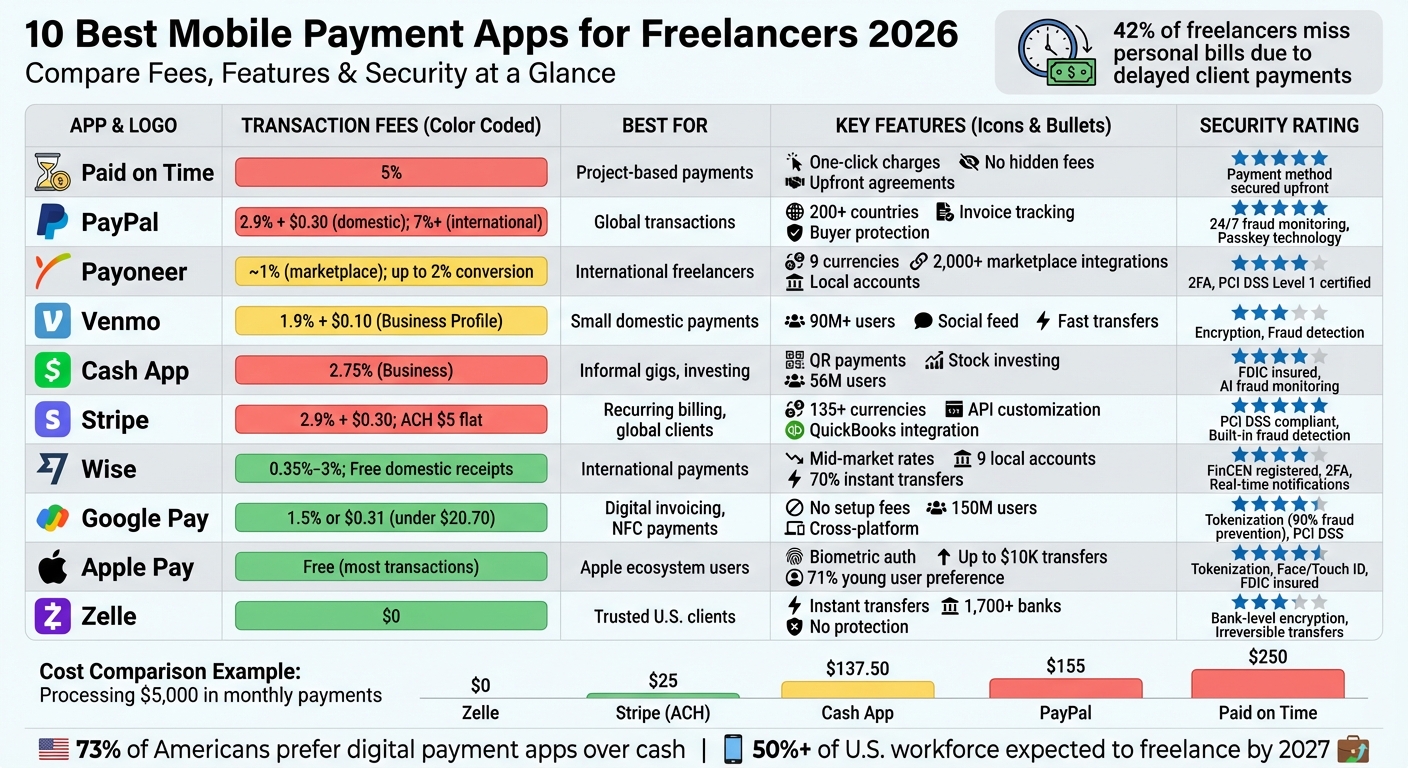
Mobile Payment Apps for Freelancers: Fees, Features & Security Comparison 2026
7 BETTER PayPal Alternatives for Freelancers to Collect Payments
sbb-itb-66f4c95
1. Paid on Time
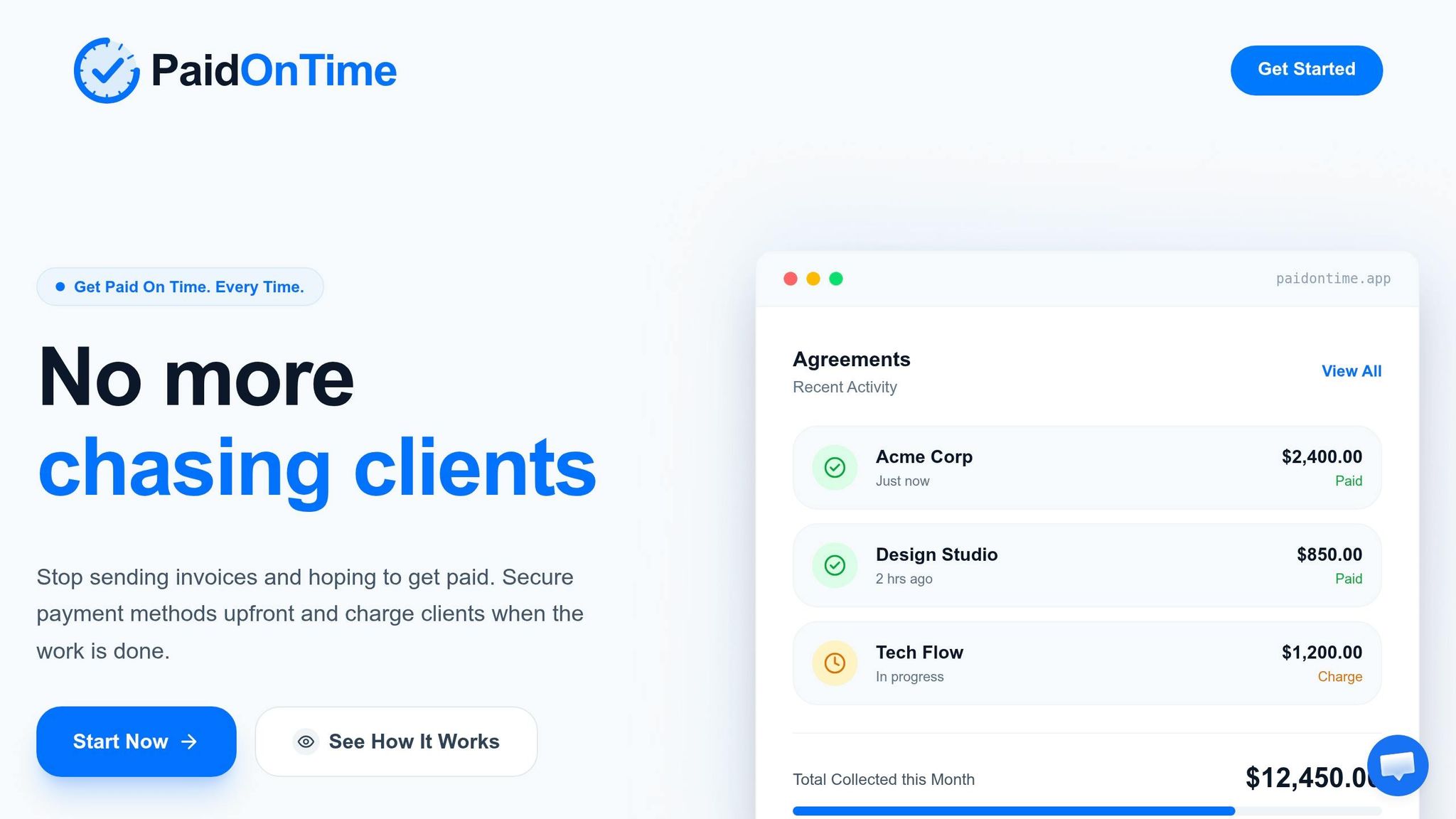
Paid on Time simplifies the payment process for freelancers by creating a binding agreement, securing the client’s payment method upfront, and enabling one-click charges once the work is completed. This eliminates the need for manual invoicing and avoids delays in follow-ups. The platform also offers a straightforward fee system, making it easy to understand exactly what you’re paying.
Transaction Fees
With Paid on Time, you’ll pay a 5% transaction fee, and there are no monthly subscription charges. You only pay when you receive payment, ensuring there are no surprise or hidden costs eating into your earnings.
Security Features
The platform ensures the client’s payment method is secured right from the start and automatically generates clear payment receipts. This approach minimizes the risk of disputes and provides clarity, functioning much like an escrow service but without the added layers of complexity.
Best Use Cases for Freelancers
For freelancers handling project-based work, Paid on Time offers a practical solution to ensure smooth and reliable cash flow. Its one-click charge feature eliminates invoicing headaches, allowing you to concentrate on your craft. Whether you’re a designer, developer, consultant, or another professional working on deliverable-based projects, this tool helps you get paid efficiently and with less hassle.
2. PayPal
PayPal is one of the most widely used digital payment platforms, operating in over 200 countries and integrated into major freelance marketplaces. It’s available on iOS, Android, and desktop, offering freelancers tools like professional invoicing, real-time tracking of invoice views, and access to funds through a PayPal Debit Mastercard for everyday spending. These features make it a reliable option for maintaining consistent cash flow.
Transaction Fees
PayPal’s fee structure can eat into your earnings, especially for smaller payments or international transactions. For domestic payments, the standard fee is 2.99% + $0.49. However, if you’re using PayPal Checkout or Venmo for business payments, the rate increases to 3.49% + $0.49. For instance, that flat $0.49 fee alone could take up nearly 5% of a $10 transaction.
International transactions are even pricier. On top of the domestic fee, there’s an additional 1.50% cross-border surcharge and a 3% to 4% currency conversion markup. For example, in March 2026, a European designer receiving €2,000 for a project ended up with approximately $1,850 after all fees and conversions. For freelancers working with international clients, these combined costs can push the total fee beyond 7%.
"The headline percentage does not represent operating reality once you include cross-border behavior, conversion, and payout preferences".
This sentiment was shared by Ayush Agarwal, Co-founder & CPTO of Dodo Payments.
Security Features
PayPal prioritizes security with 24/7 fraud monitoring and financial-grade encryption for all transactions. The platform also supports passkey technology, allowing you to log in with biometrics like facial recognition or fingerprints instead of passwords, which adds an extra layer of protection against phishing attacks. Freelancers also benefit from Seller Protection, which covers unauthorized payments and non-delivery claims for "Goods and Services" transactions. Importantly, your financial data remains encrypted and is never shared with recipients.
Best Use Cases for Freelancers
PayPal is ideal for freelancers with mostly domestic clients who appreciate the convenience of its "Click to Pay" feature and need a fast, trustworthy payment system. The mobile invoicing feature is particularly handy, as it lets you know exactly when a client has viewed your invoice, making follow-ups more effective. For those selling digital goods under $10, you can contact PayPal to switch to their micropayment rate of 5% + $0.05, which can significantly reduce transaction costs. To save even more, avoid instant withdrawals (which cost 1.50% of the transfer amount) and stick to the standard 1–3 day transfer option.
3. Payoneer
Payoneer is a go-to option for freelancers working across borders. With direct integration into more than 2,000 marketplaces - like Upwork, Fiverr, Amazon, and Airbnb - it’s widely used by platform-based freelancers. One of its standout features is the ability to receive payments in nine different currencies, including USD, EUR, and GBP. This makes it easier for international clients to pay you as though you had a local bank account.
Payoneer focuses on making international payments straightforward and transparent, offering a user-friendly solution for global transactions.
Transaction Fees
Payoneer charges a 1% fee for receiving payments from marketplaces. For withdrawals to your local bank, there’s either a flat $1.50 fee (if your monthly volume is under $50,000) or a 0.5% fee for higher amounts. Currency conversion fees are up to 2% above mid-market rates, which is often lower than competitors. For example, in a March 2026 case study, a European designer received a €2,000 payment for a project. Using Payoneer, they retained $1,920, compared to $1,850 with PayPal - saving $70.
However, be aware of additional costs. There’s a $29.95 annual account fee unless you receive at least $2,000 in payments over 12 months. Also, withdrawals under $400 may incur a fixed $4 fee, which can translate to an effective charge of 1% to 4%.
Security Features
Payoneer prioritizes secure transactions with several safeguards in place. It uses two-factor authentication (via SMS, phone calls, or app notifications) to verify sensitive actions like withdrawals. The platform also employs RSA adaptive authentication to evaluate risk factors such as your location, IP address, and transaction amounts, flagging any unusual activity. Transactions are monitored in real time for fraud, and the system is PCI DSS Level 1 certified, following independent SOC 1 and SOC 2 Type II assessments.
That said, some users have reported slower dispute resolution. On Trustpilot, Payoneer holds an average rating of 3.8 out of 5 from over 62,000 reviews. Around 75% of negative feedback mentions issues like frozen accounts or blocked funds during verification processes.
Best Use Cases for Freelancers
Payoneer is particularly useful for freelancers who earn through international marketplaces and need to consolidate income from multiple sources. For those using platforms like Fiverr or Upwork with clients in Europe, Asia, and North America, Payoneer’s local receiving accounts simplify cross-border payments, avoiding the hassle of wire transfers. It’s best suited for freelancers who can consistently earn at least $2,000 annually to avoid account fees and who prefer transferring funds in larger amounts to reduce the impact of flat withdrawal fees.
4. Venmo
Venmo has become a household name in the United States, boasting over 90 million users as of 2026. While it’s commonly associated with splitting bills among friends, freelancers need to tread carefully. To comply with Venmo’s terms and avoid potential account freezes, freelancers must use a Business Profile for professional transactions.
This distinction isn’t just about following the rules - it directly impacts transaction fees and account safety. For example, personal accounts incur a 2.99% fee for payments marked as "goods and services", whereas Business Profiles are charged a lower rate of 1.9% + $0.10 per transaction. On a $1,000 payment, that difference saves around $10.80. Venmo’s policy is clear:
"Venmo may NOT otherwise be used to receive business, commercial or merchant transactions... unless explicitly authorized by Venmo."
Now, let’s dig into Venmo’s fee structure and what it means for freelancers.
Transaction Fees
Venmo’s fee structure is straightforward, but it’s worth understanding the details:
- Standard Bank Transfers: Free, with processing times of 1–3 business days.
- Instant Transfers: Available for 1.75% of the transfer amount (minimum $0.25, maximum $25).
- Sending Payments: Free if funded by a bank account or debit card; credit card payments incur a 3% fee.
- Weekly Limits: Unverified accounts are capped at $299.99, but this increases to $60,000 once you verify your identity.
These fees and limits make Venmo a practical option for small, quick payments, though larger transactions may require some planning.
Security Features
Venmo prioritizes security alongside its transparent fees. The app uses encryption and anonymized tokens to safeguard card details and complies with PCI Data Security Standard requirements. Fraud-detection systems are in place to monitor for unusual activity, adding another layer of protection.
However, one thing to note is that Venmo transactions are public by default. Payment histories, including client names and descriptions, appear on a social feed visible to other users. To protect your privacy - especially if your work involves sensitive information - set your transactions to "Private" in the app’s settings.
Best Use Cases for Freelancers
Venmo shines when it comes to fast, simple domestic payments. It’s ideal for US-based freelancers working with domestic clients who already use the app. The platform is particularly handy for quick, informal transactions like:
- Payment for small design tweaks or edits
- Consulting calls
- Rush projects requiring immediate payment
That said, Venmo has its limitations. It doesn’t support international payments and requires a US bank account. Additionally, peer-to-peer transfers lack buyer protection, and payments are generally irreversible once sent. To mitigate these risks, freelancers can formalize agreements upfront to ensure payment security. Freelancers should also keep in mind that, as of 2022, Venmo is required to report gross payments over $600 annually to the IRS via Form 1099-K. Keeping detailed records of your transactions is essential for tax season.
For freelancers who value speed and simplicity in domestic transactions, Venmo can be a reliable tool - just be sure to use it wisely and stay within its intended use cases.
5. Cash App
Cash App has grown beyond simple peer-to-peer transfers, offering freelancers a mobile-friendly way to manage professional payments through its Business profile. If you're a freelancer, using the Business profile is key to handling payments professionally and avoiding potential account issues.
The Business profile comes with a flat 2.75% fee on all payments received. For credit card payments, the fee is slightly higher at 3%. However, standard peer-to-peer transfers remain free when linked to a bank account or debit card. The app also enforces receipts for transactions exceeding $15 and requires customer signatures for payments above $25. These features ensure clarity in financial transactions, making it a solid option for freelancers.
Security Features
Cash App prioritizes security with PCI DSS Level 1 compliance, bank-grade encryption, and fraud monitoring powered by AI. Since 2020, these measures have reportedly blocked up to $2 billion in potential scams. Instead of traditional passwords, the app uses one-time login codes sent via email or SMS. Freelancers can further secure their accounts by enabling the Security Lock feature, which requires a PIN, Touch ID, or Face ID for every transaction. Additionally, the "Card Lock" feature allows users to instantly disable their Cash App Card if it's lost or stolen. For those with a Cash App Card, eligible balances are protected by FDIC pass-through insurance up to $250,000.
Supported Platforms
Cash App works on both iOS and Android devices and integrates seamlessly with Square hardware for in-person point-of-sale transactions. This makes it ideal for freelancers who meet clients face-to-face. The physical Cash Card, linked to your Cash App balance, can be used for online and in-store purchases, adding flexibility for everyday transactions. These platform features cater to freelancers who need quick, mobile payment options.
Best Use Cases for Freelancers
Cash App is particularly useful for freelancers in casual gigs - think dog walkers, babysitters, or street performers - who rely on fast, in-person payments via QR codes. Beyond payments, the app offers tools to file taxes and even invest in fractional stocks or Bitcoin starting at just $1. These added features help freelancers manage their finances more effectively and keep cash flow steady. However, it’s worth noting that the app is limited to U.S. residents, doesn’t include buyer protection, and imposes initial payment limits that increase once identity verification is completed.
6. Stripe
If you're a freelancer looking for advanced payment customization and global flexibility, Stripe is a solid choice. It’s designed with a focus on secure, fast, and reasonably priced payment solutions. Stripe charges 2.9% + $0.30 for domestic transactions, but it also offers ACH transfers capped at $5 per transaction. This can significantly reduce costs for larger invoices. For instance, processing a $1,000 invoice through ACH costs just $5, compared to $29.30 when using a credit card.
Transaction Fees
Stripe applies an additional 1.5% fee for international cards, bringing cross-border transactions to roughly 4.3% in total fees. If currency conversion is involved, there's a 2% markup over the mid-market exchange rate. Additionally, disputes or chargebacks come with a $15 fee. These transparent fees, coupled with Stripe's flexibility, make it a great option for freelancers.
Security Features
Stripe takes security seriously, encrypting transactions and offering built-in fraud detection. It supports payments in over 135 currencies, giving freelancers the ability to accept international payments without worrying about security. Whether you bill hourly, per project, or on a recurring basis, Stripe’s unified system keeps payment data secure and organized.
Supported Platforms
Stripe’s API is a standout feature, enabling freelancers to customize payment processes using Stripe Checkout or Payment Links - no coding required. These links can be shared via email or social media, making it easy to collect payments. Stripe also integrates seamlessly with tools like QuickBooks for accounting and Salesforce for CRM needs. Plus, its mobile-friendly dashboard lets you manage payments anywhere, making it a great fit for busy freelancers with diverse clients.
Best Use Cases for Freelancers
Stripe is particularly useful for freelancers who manage recurring billing or subscription-based clients. Its global capabilities - handling 135+ currencies and various local payment methods - make it ideal for those working with international clients. For high-value invoices, opting for ACH transfers instead of credit cards can lead to major savings, making Stripe both versatile and cost-efficient.
7. Wise
For freelancers working with international clients, Wise stands out with its straightforward pricing and use of real mid-market exchange rates. Unlike PayPal, which often adds a 3% to 4% markup on currency conversions, Wise applies the same exchange rate you’d find on Google - no hidden fees involved [55,56,61]. If you frequently convert currencies, this could save you hundreds of dollars each year.
Transaction Fees
Wise operates on a simple, pay-as-you-go fee structure with no monthly subscription costs for standard accounts [55,61]. Currency conversion fees range between 0.35% and 3%, and sending money starts at 0.57% [55,56,61]. Domestic payments in major currencies like USD, EUR, GBP, AUD, and CAD are free to receive [55,56]. However, receiving USD via wire transfer comes with a fixed $6.11 fee, while GBP received through SWIFT costs £2.16.
Security Features
Wise prioritizes security and is registered with the Financial Crimes Enforcement Network (FinCEN) in the U.S., while also being regulated by authorities worldwide [62,64]. The platform employs industry-standard encryption and two-factor authentication to protect your account [61,64]. You’ll also get real-time push notifications for every transaction, so you can keep tabs on your activity as it happens. Additionally, automated fraud detection provides an added layer of protection by monitoring for unusual behavior [61,64].
Supported Platforms
Wise offers flexibility across devices and integrates seamlessly with popular accounting tools. The platform is accessible on iOS, Android, and web browsers, and it connects directly with QuickBooks, Xero, and FreeAgent [56,58,61,62,63]. For mobile transactions, you can use Wise with Apple Pay and Google Pay. Impressively, over 70% of Wise payments are processed instantly, and the platform supports wire transfers up to $1,000,000 from the U.S..
Best Use Cases for Freelancers
Wise is a great fit for freelancers working with clients in multiple countries or holding balances in various currencies. You can get local account details in more than 9 currencies (such as USD, GBP, EUR, and AUD), allowing clients to pay you as if you were based locally - avoiding international transfer fees [56,58]. The BatchTransfer feature is especially handy for paying up to 1,000 recipients at once, making it ideal for freelancers managing subcontractors or global teams [56,61]. For large currency conversions over $25,000, Wise even offers volume discounts on fees [55,59]. With its efficient tools, Wise simplifies international payments for freelancers navigating diverse financial needs.
8. Google Pay
Google Pay stands out as a secure and practical payment option for freelancers looking for a simple way to handle transactions. With no setup fees or monthly subscriptions, it’s a budget-friendly choice. Payments are processed quickly - funds often arrive instantly or within a few hours, though standard bank deposits may take 3–5 days to complete. For freelancers who want to accept digital payments without splurging on expensive hardware, Google Pay offers a straightforward solution.
Transaction Fees
The platform charges a fee of either 1.5% of the transaction amount or a flat $0.31 for payments under $20.70. Depositing funds is free, though standard processing fees from your payment processor may still apply. For those who need advanced tools, Google Workspace integration options are available, costing between $6 and $18 per user per month.
Security Features
Google Pay prioritizes security with tokenization technology, which replaces your actual card details with virtual, single-use tokens for each transaction. This method has been shown to prevent over 90% of fraudulent transactions. Payments require authentication through a PIN, pattern, password, or biometrics. If your phone is lost or stolen, you can remotely lock it, sign out, or erase data using the "Find My Device" feature. The platform also complies with PCI DSS standards and uses machine-learning algorithms to detect suspicious activity in real time. Importantly, Google does not sell your transaction history or use it for ad targeting.
Supported Platforms
Google Pay works across Android, iOS, web browsers, and Wear OS devices. It integrates seamlessly with e-commerce platforms like Shopify and Magento, as well as POS systems such as Square and Clover. With around 150 million users globally projected by 2026, the service operates in over 30 countries and supports more than 10 currencies. PCMag rated it 4.0 out of 5 in 2026, highlighting its ability to store digital tickets, loyalty cards, and facilitate secure contactless payments. These features make Google Pay a flexible solution for both online and in-person transactions.
Best Use Cases for Freelancers
Google Pay is particularly useful for service-based freelancers who need to send agreement-backed invoices and request payments digitally. Its fast processing times and broad integrations make it a reliable choice. For those meeting clients face-to-face, the contactless NFC payment option allows you to accept payments on the spot without needing a card reader. Additionally, the web interface makes it easy to manage transactions from your desktop when you’re not using your phone. According to a Google case study, 34% of Google Pay purchases for one company came from entirely new customers, showing that the platform can also help you connect with clients who prefer mobile payment methods.
9. Apple Pay
Apple Pay gives freelancers a secure and simple way to manage payments, but it’s designed exclusively for those using Apple devices. In April 2026, PCMag gave it a solid 4.0 out of 5, highlighting its "anonymous single-use token system" for protecting financial data. Since it runs only on Apple products - like iPhones, Apple Watches, iPads, and Macs - it’s a great fit for freelancers already using Apple hardware in their daily work.
Its integration with Apple’s ecosystem ensures straightforward fee structures and strong security measures.
Transaction Fees
One of Apple Pay’s perks is that it’s fee-free for both freelancers and clients in most cases. If you’re using Apple Cash for peer-to-peer payments, standard bank transfers are free and typically take 1–3 business days. Need the money faster? Instant Transfers to an eligible debit card are available for a 1.5% fee (with a minimum charge of $0.25 and a maximum of $15). However, if your client uses a credit card to fund the payment, a 3% fee applies.
Security Features
Apple Pay prioritizes security with tokenization, which replaces sensitive card details with a unique device account number. This ensures your actual card information stays private. Payments also require biometric authentication, like Face ID or Touch ID, adding another layer of protection. On top of that, balances stored in Apple Cash are FDIC-insured up to $250,000 through Green Dot Bank, and the platform complies with PCI Data Security Standard (PCI DSS) regulations.
Supported Platforms
Apple Pay works exclusively on Apple devices and supports Apple Cash peer-to-peer payments in the U.S. Users can send up to $10,000 in a single message, with a weekly cap of $10,000. With iOS 17 and later, the Tap to Cash feature allows payments by simply holding two iPhones together, keeping your personal information private. PCMag’s Gabriel Zamora noted:
"Apple Pay is a game-changer for people on the move, especially those using public transit".
Best Use Cases for Freelancers
Apple Pay shines for U.S.-based freelancers who need secure and fast domestic payments. The contactless payment option is perfect for in-person meetings, eliminating the need for extra hardware. Plus, if you’re using an Apple Card, you can earn up to 3% cash back on business-related purchases. Considering that about 71% of young digital wallet users identify Apple Pay as their go-to payment method, offering it as an option can make transactions more appealing to tech-savvy clients. To fully benefit, verify your identity in the Wallet app to increase your Apple Cash balance limit to $20,000 and your transaction limit to $10,000.
10. Zelle
Zelle stands out for offering free, instant bank-to-bank transfers - something no other payment app on this list provides. With integration into over 1,700 U.S. banks and credit unions, there’s a good chance it’s already part of your mobile banking app, so you might not even need to download anything extra. For freelancers, cutting out transaction fees is a big deal. While many apps charge fees up to 1.75%, Zelle lets you keep every dollar you earn.
That said, Zelle treats transactions like cash payments. Once the money is sent or received, it’s final - there’s no buyer or seller protection. As PCMag explains:
"Once you pay someone through the app, consider it the equivalent of handing over cash".
Because of this, Zelle works best for freelancers who already have trusted, long-term relationships.
Transaction Fees
Zelle doesn’t charge anything for sending, receiving, or transferring money instantly to your bank account. Funds arrive within minutes, completely free of charge. For a freelancer earning $5,000 per month, avoiding a 1.75% fee saves about $87.50 monthly - that’s over $1,000 a year.
Security Features
Since Zelle operates through your bank, it uses your bank’s existing security systems. Transfers only require a U.S. mobile number or email address. However, keep in mind that most banks’ zero-liability fraud policies don’t apply to peer-to-peer transactions. Double-check the recipient’s information before sending money, as payments sent to the wrong person are nearly impossible to recover. While secure and fast, the lack of buyer or seller protection means users need to be extra cautious.
Supported Platforms
Zelle is available as a standalone app for iOS and Android, but it’s also built into the mobile banking apps of over 1,700 U.S. financial institutions. Transfers can even be initiated through your bank’s website. However, Zelle is strictly for domestic use - there are no international transfers, no credit card support, and both the sender and recipient must have U.S.-based bank accounts. Daily transfer limits vary by bank, typically ranging from $500 to $5,000.
Best Use Cases for Freelancers
Zelle is ideal for U.S.-based freelancers working with trusted clients. It’s perfect for regular payments, long-term contracts, or situations where immediate access to funds is important - and all without processing fees. High-volume freelancers will appreciate the savings, and The Penny Hoarder even called it the "Most Accommodating" money transfer app. However, for first-time clients or transactions requiring buyer protection, it’s better to look at other options.
Feature Comparison Table
When selecting a payment app for your freelance business, it's crucial to balance transaction fees with features that align with your needs. Below is a detailed comparison of ten popular apps, covering fees, platform compatibility, standout features, and security measures.
| App | Transaction Fees | Platform Support | Key Strengths for Freelancers | User Rating | Security Features |
|---|---|---|---|---|---|
| Paid on Time | 5% per transaction | iOS, Android, Web | Legally binding agreements, secure payment method collection, one-click charge, eliminates invoicing | N/A | Clear payment records and secure payment collection |
| PayPal | 2.9% + $0.30 per business transaction | iOS, Android, Web | Global reach in 200+ countries, robust buyer protection, invoice management | 4.0/5 | Encryption and buyer/seller protection |
| Payoneer | Varies by service | iOS, Android, Web | Local receiving accounts in 9 countries, multi-currency support | N/A | Multi-currency security and regulated compliance |
| Venmo | 1.9% + $0.10 per swipe for business profiles | iOS, Android, Limited Web | Social feed for transparent bookkeeping and over 90 million active users | 3.5/5 | Encryption and biometrics; no protection for P2P transfers |
| Cash App | 2.75% for business transactions | iOS, Android, Web | Simple setup, built-in investing tools, and over 56 million monthly active users | 4.0/5 | Encryption and FDIC-insured via partners |
| Stripe | 2.9% + $0.30 per transaction | iOS, Android, Web | Developer-friendly with deep e-commerce integration and sophisticated tax/compliance tools | N/A | PCI DSS compliant with merchant-focused dispute tools |
| Wise | 2% + $1.50 for withdrawals over $100 | iOS, Android, Web | Mid-market exchange rates and transparent international transfers | N/A | U.S.-regulated with transparent FX and compliance standards |
| Google Pay | Free for users (merchants pay standard fees) | iOS, Android, Web | Centralized hub for tickets/cards and a clean, user-friendly interface | 4.0/5 | Virtual card numbers and biometrics; lacks default buyer protection |
| Apple Pay | Free for users (merchants pay standard fees) | iOS, Safari Only | Ultra-fast biometric checkout (under 2 seconds) and seamless Apple ecosystem integration | 4.0/5 | Tokenization, Face ID/Touch ID, and anonymized tokens |
| Zelle | $0 | iOS, Android, Web** | Instant bank-to-bank transfers with integration in over 1,700 U.S. banks | N/A | Bank-level encryption; transfers are irreversible |
*Web interface exists but does not support person-to-person payments.
**Typically accessed via your existing online banking portal.
Key Takeaways for Freelancers
Transaction fees can vary significantly between apps. For example, processing $5,000 through PayPal would cost about $155 in fees, while Zelle charges nothing. However, Zelle's fee-free transfers come without buyer protection, which could be a concern for managing disputes.
For international freelancers, Wise offers a cost-effective solution by using mid-market exchange rates, potentially saving hundreds on currency conversion. Meanwhile, Paid on Time simplifies the invoicing process by securing payments upfront, reducing the risk of delayed payouts.
Platform compatibility also plays a big role. Apple Pay is ideal for Apple users seeking fast and secure checkouts, while Google Pay provides a flexible interface across devices. On the other hand, Stripe caters to tech-savvy freelancers who need custom billing or website integration.
Security is another critical factor. While all apps employ encryption and biometrics, features like dispute resolution vary. Apps like PayPal and Stripe are equipped to handle disputes, whereas Venmo, Cash App, and Zelle treat payments like cash - once sent, they’re usually irreversible.
With 73% of Americans now favoring digital payment apps over cash, choosing the right app can help freelancers maintain steady cash flow while ensuring financial security.
Conclusion
Choose a payment app that aligns with your workflow, client needs, and financial goals.
Here are some key points to help you decide:
- Client Locations: If most of your clients are in the US, Zelle offers instant, fee-free transfers. For international transactions, Wise stands out with its transparent exchange rates, helping you save money. High-volume freelancers may benefit from Stripe, which provides advanced tax reporting and PCI compliance.
- Workflow Compatibility: Your preferred app should integrate seamlessly with your work processes. For those using platforms like Upwork or Fiverr, PayPal and Payoneer make withdrawals easy. Service professionals working face-to-face - like consultants or event planners - can take advantage of Square’s point-of-sale features. If late payments are a concern, Paid on Time simplifies the process with upfront-secured payments and one-click invoicing.
- Hidden Costs: Don’t overlook fees that aren’t always obvious. Low advertised rates may hide poor exchange rates, and instant deposit or withdrawal fees can add up. Offering multiple payment options - like credit cards, ACH, and digital wallets - can also reduce friction and speed up payments.
- Security: Protecting your transactions is critical for both cash flow and credibility. For large contracts, escrow services can ensure funds are held securely until milestones are met. Avoid using personal peer-to-peer apps like Venmo for business, as violating their terms could result in frozen accounts or withheld funds.
For a quick comparison of benefits and costs, refer to the feature table provided earlier.
FAQs
Which payment app is best for getting paid on time?
PaidTu stands out as the top payment app for making sure you get paid on time. It’s designed with freelancers in mind, allowing you to create and send invoices quickly. Plus, clients can pay using flexible, customizable options. This smooth process cuts down on delays, so you can count on receiving payments promptly.
How can I minimize fees on international client payments?
To save on fees for international payments, opt for platforms that provide competitive exchange rates and low transaction costs. Prioritize services that offer mid-market rates and clearly disclose their fees, so you don’t lose money to hidden markups or flat charges. Additionally, using options like local bank transfers, digital wallets, or platforms that support local currencies can significantly cut down on foreign exchange and transfer fees, helping you retain more of your hard-earned money.
What’s the safest way to accept payments from new clients?
When dealing with new clients, the safest way to accept payments is through secure and trustworthy payment platforms. Choose apps that prioritize secure transactions, include fraud protection, and offer tools to minimize disputes. These features not only safeguard your funds but also help verify client identities, providing peace of mind for both parties involved.