Ultimate Guide to Freelance Invoice Customization
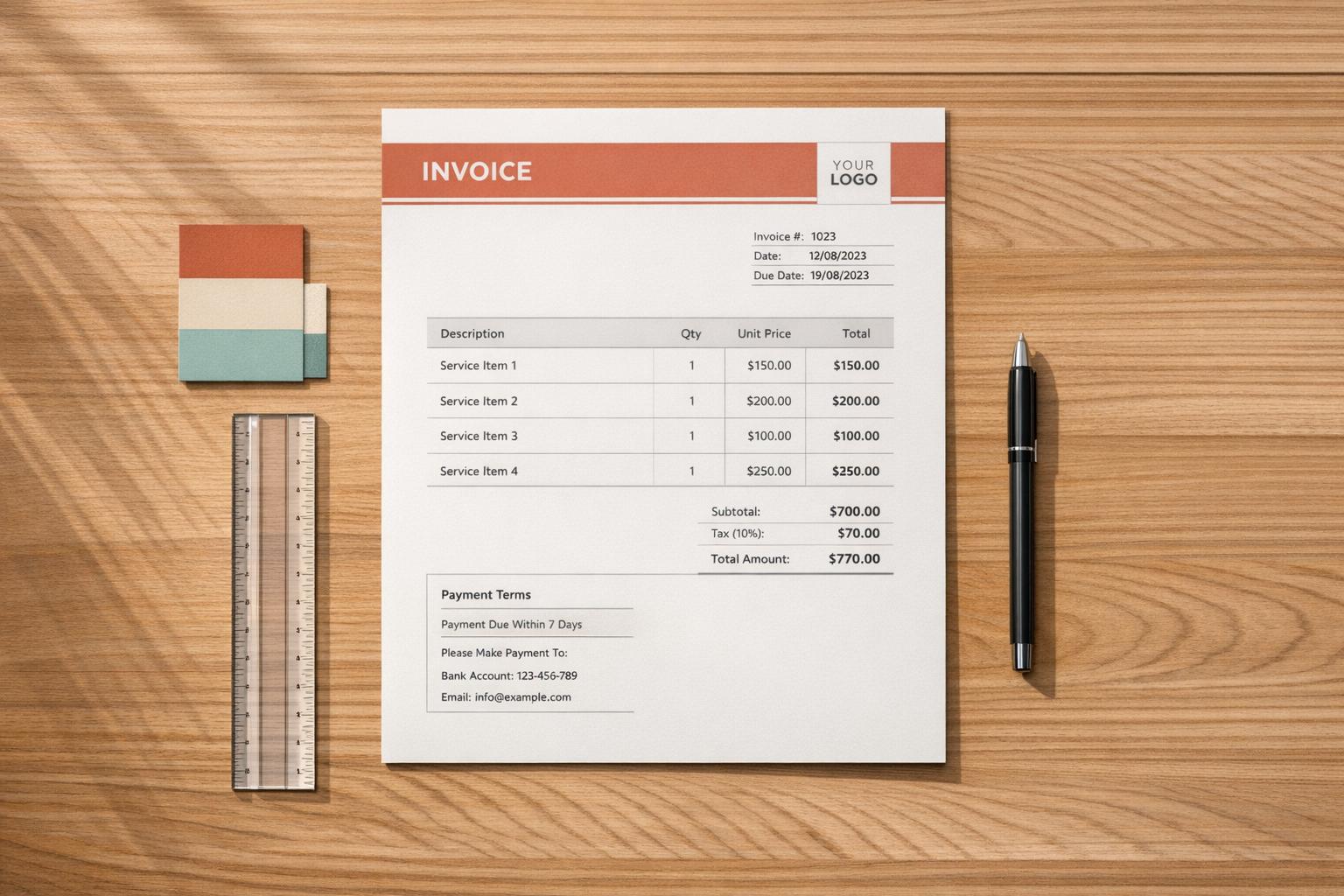
Ultimate Guide to Freelance Invoice Customization
Want to get paid faster and avoid client disputes? Start with a better invoice.
Over 70% of freelancers face payment delays, with late payments averaging 39 days past due. One major culprit? Poorly presented invoices. A professional, well-designed invoice can:
- Build trust and credibility with clients.
- Speed up payments by up to 30%.
- Improve your business image.
This guide covers everything you need to know to create invoices that work:
- Key design tips for clarity and branding.
- Must-have components like payment terms, totals, and client details.
- Strategies for setting deadlines, late fees, and payment methods.
- Tools like Paid on Time to simplify invoicing and automate reminders.
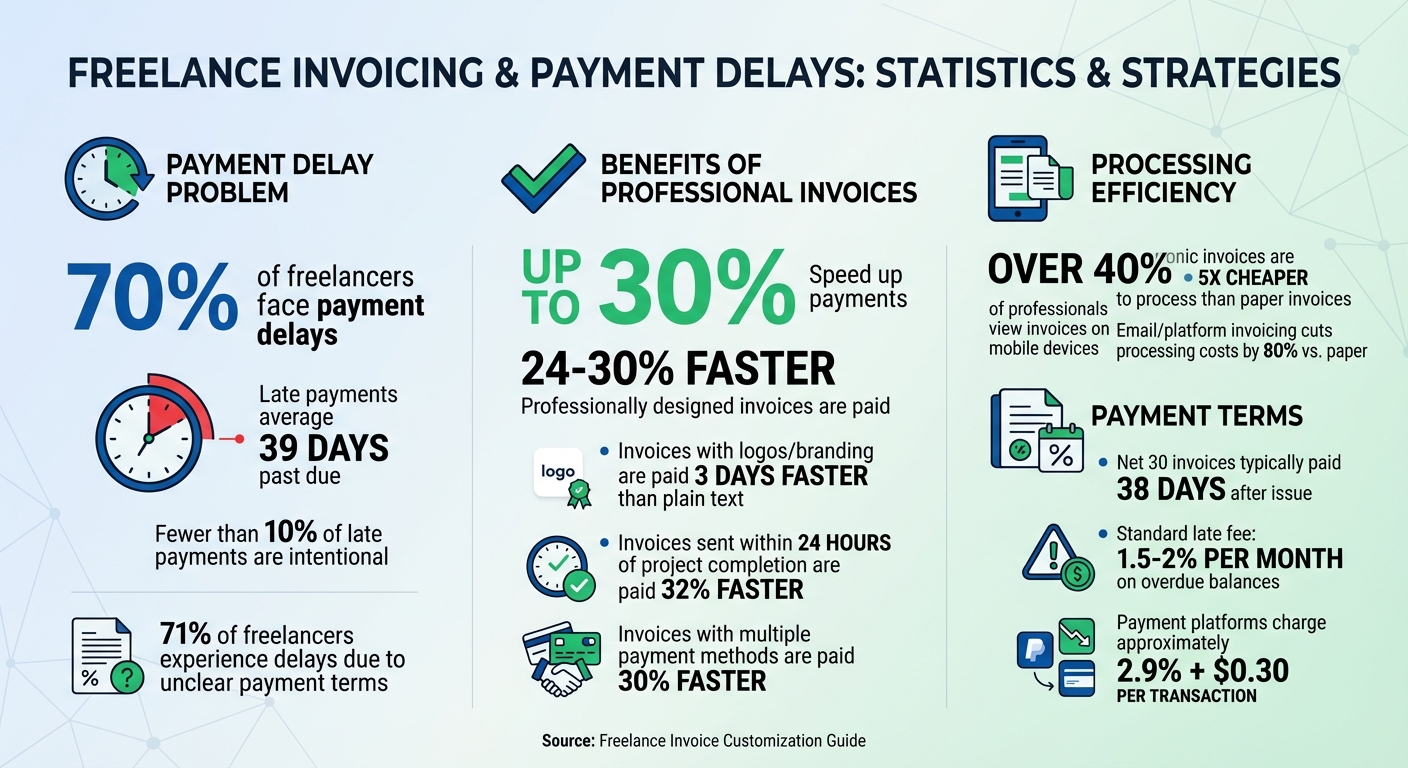
Freelance Invoice Statistics: Payment Delays and Professional Invoice Impact
The Invoice Template Every Freelancer Needs in 2026
sbb-itb-66f4c95
Design Principles for Professional Invoices
How your invoice looks can directly influence how quickly you get paid. A well-designed invoice makes it easier for clients to process payments, cutting down on delays. Below, you'll find key principles for creating invoices that are clear, professional, and aligned with your brand.
An invoice isn't just a request for payment - it's a reflection of your business. As QuickBillMaker explains:
"Professional invoice design is not about aesthetics - it's about payment optimization."
Since invoices are often your final interaction with a client, they should convey professionalism, organization, and reliability. A clean, polished design leaves a positive impression, while a cluttered or generic one might cast doubt on your operation’s credibility.
Combining Clarity with Branding
Your invoice should balance brand identity with readability. Start by placing your logo prominently - top-left for a classic look, top-center for a modern feel, or top-right for a contemporary vibe. Use a high-resolution PNG (300 DPI for print, 150 DPI for digital) with a transparent background. Keep the logo height between 40–60px to ensure visibility without overpowering the page.
Color choices can also make a difference. Invoices featuring logos and branded elements are typically paid about three days faster than plain text invoices. Stick to 2–3 colors that align with your brand. Use these for accents, like headers, dividers, or to highlight "Amount Due", while keeping the main text in black or dark gray on a white background for easy reading. For example:
- Blue suggests trust and professionalism.
- Green conveys growth and financial health.
- Purple signals luxury and premium services.
Make sure your design meets accessibility standards by maintaining a contrast ratio of at least 4.5:1 between text and background. Since many clients still print invoices, test your design in black and white to ensure it remains clear.
The footer or "Notes" section is an opportunity to add a personal touch. For example:
- A friendly brand might include: "Thanks for working with us! We loved this project."
- A premium brand might say: "We appreciate your continued trust in our services."
Layout and Typography Best Practices
A well-organized layout not only looks professional but also helps clients process payments faster. Use visual hierarchy to guide attention to key details. The "Total Amount Due" should stand out the most - try using an 18–24pt bold font to make it unmistakable. Follow the natural "F" reading pattern by placing:
- Your logo in the top-left
- Invoice details (like number and date) in the top-right
- The total amount in a prominent spot at the bottom-right
Stick to two fonts: one for headings and another for body text. Sans-serif fonts like Arial, Helvetica, or Open Sans give a modern feel, while serif fonts like Georgia or Times New Roman create a traditional tone. Keep body text between 10–12pt and headings between 16–20pt for readability.
Use generous spacing - 30–50px margins and 40–60px between sections - to make the invoice easy to scan. Line items should have 20–30px spacing to maintain a neat and organized look. For added clarity, left-align text and right-align numbers. In tables, consider using "zebra striping" (alternating row colors) or clear borders to improve readability.
With over 40% of professionals viewing invoices on mobile devices, a single-column layout is essential. Include touch-friendly payment links to make the process seamless.
| Layout Style | Best For | Key Advantages |
|---|---|---|
| Traditional | B2B, legal, accounting | Familiar to clients; easy to scan; print-friendly |
| Modern Centered | Creative agencies, tech, freelancers | Visually striking; contemporary aesthetic |
| Compact | Invoices with many line items | Space-efficient; reduces page count |
Required Invoice Components
An incomplete invoice can slow down payments. As OwnedWork aptly notes:
"Every missing field is a potential friction point between you and your money."
When details are missing, clients often pause to seek clarification, delaying the payment process. Interestingly, fewer than 10% of late payments are intentional. The solution? Ensure your invoice includes all necessary details from the outset.
Information You Must Include
Start by labeling your document clearly as "Invoice" (or "Tax Invoice" if applicable). Assign it a unique, sequential number, such as INV-2026-001, to ensure proper tracking and compliance with legal requirements. The IRS advises freelancers to keep income and employment records for at least four years, so a consistent numbering system is essential.
Provide your full legal name and business address, along with your email and phone number. If you run a limited company, also include your registration number and registered office address. For your client, list their official business name, billing address, and a designated contact. Keep in mind that many corporate finance departments will reject invoices if the business name doesn't match their internal records exactly.
Dates are crucial. Include the invoice issue date, the date services were performed, and a specific payment due date. Instead of using terms like "Net 30", specify a clear deadline, such as "Payment due by May 1, 2026." This eliminates the need for clients to calculate deadlines, a common source of delays. If your client has issued a Purchase Order (PO) number, make sure it is prominently displayed - many larger companies won't process invoices without one.
For the services section, break down your work into clear, itemized descriptions. Avoid vague terms like "Consulting" and opt for specifics, such as "UI/UX design consultation – homepage redesign." Include quantities or hours, unit prices or hourly rates, and line totals. Even for flat-fee projects, breaking down the total into line items adds clarity and minimizes questions.
Clearly display financial totals, including the subtotal, any applicable taxes (like sales tax or VAT), discounts (if any), and the grand total. Highlight the total amount due using bold text or a larger font size. Finally, provide detailed payment instructions, such as bank account numbers, routing numbers, IBAN/BIC codes for international payments, or direct payment links. Clear payment details prevent unnecessary follow-ups and streamline the process. For more tips on managing your finances, explore our freelancer tools and payment guides.
By including all of these elements, you create an invoice that can be quickly reviewed and processed.
Structuring Information for Easy Review
Once you’ve gathered all the required components, organize them in a way that makes the invoice easy to review. Start with a header that includes your branding and contact details, followed by a middle section with an itemized table of services. End with a footer containing totals, payment terms, and a brief thank-you note.
Use a table to lay out your line items, ensuring descriptions are left-aligned and numbers are right-aligned for better readability. If you bill by the hour, include your rounding policy (e.g., rounding to the nearest 15 minutes) to maintain transparency.
Place payment terms in a dedicated section near the bottom. Include any late fee policies, such as charging 1.5% per month on overdue balances. Even if late fees are rarely enforced, they serve as a psychological nudge for clients to prioritize your invoice. Since payments are processed twice as quickly when freelancers accept online methods like credit cards or ACH transfers, add direct "Pay Now" links to your invoice.
For larger clients, ask if they require specific project references or job codes. Including this information helps ensure costs are allocated to the correct budget, speeding up approval. Additionally, electronic invoices are over five times cheaper to process than paper ones, so sending a well-structured digital invoice benefits both you and your client.
| Required Component | Purpose | Best Practice |
|---|---|---|
| Freelancer Details | Legal ID & Contact | Include legal name, address, and Tax ID/EIN |
| Client Details | Internal Routing | List official business name, billing address, and contact info |
| Invoice Number | Tracking & Audit | Use a unique, sequential system (e.g., INV-2026-001) |
| Specific Due Date | Urgency | Use a hard calendar date rather than "Net 30" |
| Itemized Items | Transparency | Provide clear descriptions, quantities, and unit rates |
| Grand Total | Action Item | Make this the most visually prominent number on the page |
| Payment Terms | Expectations | Clearly state late fee policies and accepted methods |
Setting Payment Terms and Conditions
Your payment terms outline when and how you expect to get paid. These terms are essential for maintaining cash flow and setting clear expectations. According to a recent survey, 71% of freelancers experience delayed payments due to unclear terms. To avoid this, make sure to specify deadlines, penalties for late payments, and acceptable payment methods upfront.
Payment Schedules and Deadlines
Standard payment terms often include options like Net 7, Net 14, Net 30, or "Due on Receipt." While Net 30 is common for corporate clients, research shows that invoices under this term are typically paid about 38 days after being issued. Many freelancers prefer Net 14 or Net 15 as a middle ground that balances client convenience with quicker cash flow.
For larger projects over $2,000–$3,000, breaking payments into installments is a smart strategy. A typical structure might look like this: 30% at the start, 30% at the midpoint, 30% upon final delivery, and 10% at the launch phase. As Landolio puts it:
No payment, no progress. Your contract should state that work on the next phase doesn't begin until the current milestone payment is received.
An upfront deposit is non-negotiable. For established clients, 25% upfront is standard, while for new clients or larger projects, requesting 50% upfront is more common. For smaller tasks under $500, you might even ask for full payment in advance.
To encourage quicker payments, consider using "2/10 Net 30" terms, offering a 2% discount if the invoice is paid within 10 days. Additionally, invoices sent within 24 hours of completing a project are paid 32% faster on average.
Once your payment schedule is set, include clear consequences for late payments to ensure compliance.
Late Fees and Payment Methods
Adding a late fee clause to your terms helps reinforce payment discipline. The standard rate in most industries is 1.5% to 2% per month on overdue balances. Be upfront about this on your invoices, with wording like: "Late fee of 1.5% per month applies after the due date." Including a grace period of 3–5 days and halting work if payments are over 14 days late can further protect your time and effort.
Make it easy for clients to pay by listing all accepted payment methods. Options like credit cards, ACH transfers, PayPal, or direct bank deposits can streamline the process, with invoices paid up to 30% faster when multiple methods are available. Digital invoices with integrated payment links are particularly effective.
For international clients, specify the currency - USD is often preferred - and clarify who covers exchange fees to avoid payment discrepancies. Keep in mind that platforms like Stripe and PayPal typically charge around 2.9% plus $0.30 per transaction, a small trade-off for their speed and convenience.
Tools like Paid on Time can simplify the process further by securing upfront payments and enabling one-click charges, making your invoicing system even more efficient.
Invoice Delivery and Workflow Tips
Getting paid on time isn’t just about having a well-designed invoice or clear payment terms. It’s also about how and when you deliver your invoices. A smooth delivery process and efficient workflow can make a big difference in avoiding overdue payments.
How to Send Invoices
- Send invoices within 24 hours of completing the work to improve your chances of getting paid quickly.
- Use the PDF format for your invoices. PDFs maintain your design integrity and are easy to open on any device. Plus, emailing invoices or using invoicing platforms can cut processing costs by up to 80% compared to traditional paper invoices.
- Add a clickable payment link in your invoice email. This makes it easier for clients to pay right away, reducing unnecessary delays.
To make things even more efficient, consider using automation tools to handle repetitive tasks and reduce human error.
Tools That Simplify Invoicing
Automation can be a game-changer for your invoicing process, saving time and keeping everything organized.
One great tool is Paid on Time. It simplifies invoicing by letting you set up a legally binding agreement with your client upfront. You can secure their payment method and charge them with just one click once the work is done. This eliminates the hassle of manual follow-ups, ensures a steady cash flow, and reduces disputes. The best part? It only charges a 5% transaction fee with no monthly subscription costs.
Conclusion
Customized invoices can lead to faster and more dependable payments. A professional invoice featuring your branding, clean typography, and an organized layout signals to clients that you’re operating a legitimate business - not just a hobby. This simple shift in how your business is perceived can be the difference between getting paid on time and chasing down overdue payments.
Research shows that professionally designed invoices are paid 24–30% faster, which directly improves cash flow and overall financial stability. Considering that more than 70% of freelancers have faced issues collecting payments at least once, these changes are far from minor - they can significantly impact your bottom line. To maximize clarity and avoid delays, make sure your invoices include essentials like a unique sequential number, clear due dates, detailed descriptions of the work completed, and straightforward payment instructions.
Streamlining your workflow also plays a big role in speeding up payments. Sending invoices within 24 hours - preferably as PDFs with clickable payment links - can make the entire process more efficient. Tools like Paid on Time simplify this further by automating invoicing. With these tools, you can set up agreements upfront, secure payment methods in advance, and charge clients with a single click once the work is complete.
FAQs
What should I include on every freelance invoice?
Every freelance invoice needs to cover some key details to make it clear and professional:
- Your contact and business details: Include your name, business name (if applicable), address, phone number, and email.
- Client’s contact information: Clearly state the name and contact details of the person or company you're invoicing.
- Unique invoice number: Assign a distinct number to each invoice for easy tracking and record-keeping.
- Date of issue and payment due date: Specify when the invoice was created and when payment is expected.
- Description of services/products provided: List the work or items delivered, along with the corresponding rates or fees.
- Total amount due: Clearly present the final amount owed, using U.S. dollars for consistency.
- Payment terms and methods: Outline how and when you expect to be paid, along with acceptable payment options.
These elements ensure your invoice is professional, easy to understand, and helps avoid payment delays.
How can I set payment terms that reduce late payments?
To reduce late payments, make your invoice or contract terms as clear as possible. Use precise due dates such as Net 15, Net 30, or due on receipt to set clear expectations for payment timelines. You can also include a late fee clause - like charging 1.5% per month on overdue balances - to motivate clients to pay on time. Display these terms prominently and ensure they're easy to understand to prevent any misunderstandings or disputes.
What’s the easiest way to accept payments directly from an invoice?
The easiest approach is to use payment links or integrated payment methods, which let clients complete transactions with just one click. These tools make the process smoother by offering secure, direct payments straight from the invoice. Services like Paid on Time take it a step further by securing payment details in advance and automating charges. This reduces the need for manual invoicing and helps cut down on payment disputes.